 Introduction
I created VS Code AI Council to make multi-model engineering useful without making every request a multi-agent event. It installs a custom GitHub Copilot agent system in Visual Studio Code with one visible coordinator, hidden model-specific experts, and bounded leaf reviewers.
The coordinator starts with the smallest strategy that can produce a defensible result. Most requests can be handled directly. Larger requests can be delegated to one expert, two focused experts in parallel, an adversarial debate, or a full team of configured models, and an explicit request can open a sixth tier that asks every expert for an exhaustive review.
The result is a single entry point for day-to-day work while still making multiple model perspectives available when the task warrants the additional time and cost.
The project is open source under the MIT License: github.com/blakedrumm/VSCode-AI-Council
| Project Detail | Value |
|---|---|
| Author | Blake Drumm ([email protected]) |
| Source Code | github.com/blakedrumm/VSCode-AI-Council |
| Version | 5.12.0 |
| Date Created | August 6th, 2026 |
| Last Modified | August 12th, 2026 |
| License | MIT License |
| PowerShell Compatibility | Windows PowerShell 5.1 and PowerShell 7+ |
 Requirements
Before running the installer, make sure the following are available:
- Windows with Windows PowerShell 5.1 or PowerShell 7+.
- Visual Studio Code.
- GitHub Copilot and GitHub Copilot Chat/Agent support.
- Access to each model you plan to configure.
- A workspace path when using workspace scope.
The current installer is Windows-specific because model discovery and settings resolution use Windows SQLite and %APPDATA% paths.
 Install the Council
The project lives on GitHub, which is the authoritative source for the current script, the changelog, and the license:
Download it, read it, and then run it. There is deliberately no pipe-to-shell one-liner, because an unread script from the internet should never go straight into your terminal.
Invoke-WebRequest `
    -Uri 'https://raw.githubusercontent.com/blakedrumm/VSCode-AI-Council/main/Install-VSCodeCopilotCouncil-v5.ps1' `
    -OutFile 'Install-VSCodeCopilotCouncil-v5.ps1'

Unblock-File .\Install-VSCodeCopilotCouncil-v5.ps1
Direct download mirrors are also available, including a text-format copy for environments that block .ps1 downloads:
- Install-VSCodeCopilotCouncil-v5.ps1 - The executable PowerShell script.
- Install-VSCodeCopilotCouncil-v5.txt - An identical text-format copy of the same script.
The .txt copy is generated during the release rather than committed, so the two files cannot drift apart, and each GitHub release publishes the SHA-256 digest of both so you can verify what you downloaded. A published release is immutable: republishing over an existing version fails and asks for a version bump instead.
Open PowerShell in the folder containing the script and run:
.\Install-VSCodeCopilotCouncil-v5.ps1
The interactive flow displays the discovered models, accepts one to five selections, asks which selected model should coordinate, shows the resolved paths, and validates the generated files.
After installation:
- Return to Visual Studio Code.
- Run Developer: Reload Window from the Command Palette.
- Open Copilot Chat or the Agents window.
- Select Multi-Model Engineering Council.
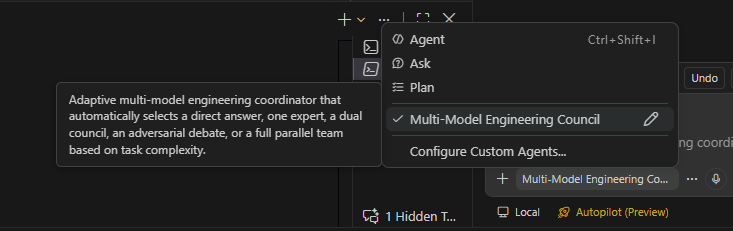
The installed coordinator appears alongside the standard Agent, Ask, and Plan options. Hover over it to see the adaptive tier description before selecting it.
 Agent Workflow Overview
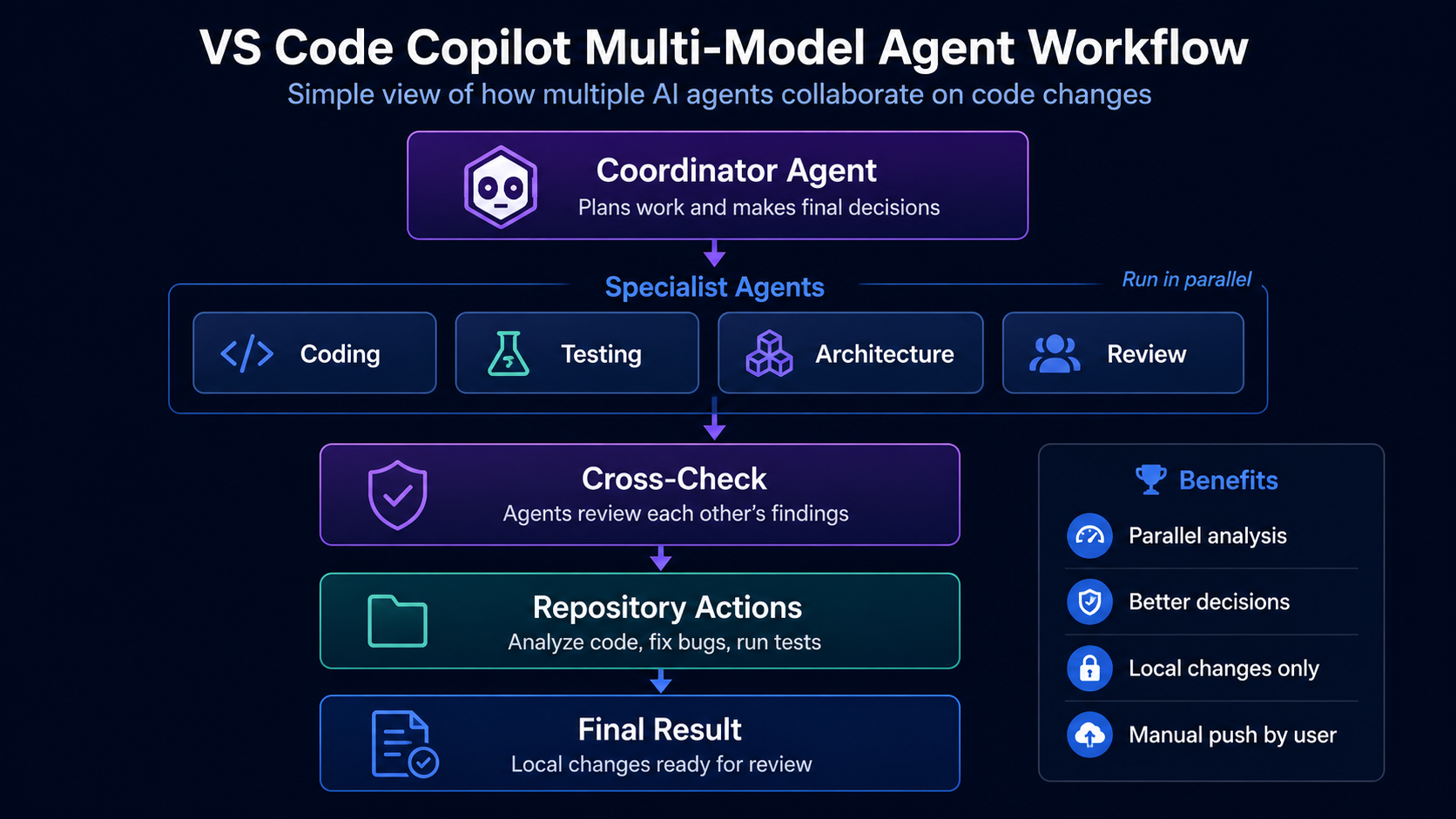
The diagram is a conceptual overview of coordinator-led planning, specialist analysis, review, repository work, and a final result. The implementation is deliberately more selective: specialists do not run for every request, and peer review uses separate leaf reviewer agents only when the selected tier allows it.
 Why I Built It
A single model can be excellent at implementation and still miss a regression, an architectural consequence, or an operational concern. Running every available model on every prompt addresses that blind spot, but it creates a different problem: duplicated investigation, higher latency, and unnecessary model usage.
VS Code AI Council takes an adaptive approach:
- Use no subagent when the coordinator can answer directly.
- Assign each model a distinct engineering lens so parallel work does not overlap.
- Delegate with concrete goals, known evidence, file paths, and explicit boundaries.
- Resolve disagreements with source code, tests, runtime behavior, and documentation instead of model voting.
- Keep nested review bounded by giving reviewers no subagent capability of their own.
The PowerShell script is an installer, not a long-running service. It generates the custom agent files, configures the required VS Code setting, validates the installation, and then exits.
 What Gets Installed
The installer creates three agent roles:
| Role | Count | Tools | Purpose |
|---|---|---|---|
| Multi-Model Engineering Council | One |
agent, read, search, edit, execute, web, todo
| User-selectable coordinator that chooses a tier, delegates work, owns repository edits, validates results, and returns one answer. |
| Model Expert | One per selected model |
agent, read, search, web
| Hidden worker with a distinct engineering lens. Experts investigate and propose; they do not edit shared files. |
| Model Reviewer | One per selected model |
read, search, web
| Hidden leaf reviewer that challenges an expert’s assumptions. Reviewers cannot invoke more agents. |
Only the coordinator receives edit and execute tools. Experts and reviewers are intentionally limited to investigation tools, while experts also receive access to their permitted reviewer list.
Experts and reviewers are generated with user-invocable: false and disable-model-invocation: false, so they stay out of the agent picker while remaining reachable through the coordinator’s explicit allowlist. The visible coordinator uses the opposite pairing and cannot be recruited as somebody else’s subagent. Post-install validation asserts both values for every role.
Because reviewers have no agent tool at all, a recursion such as GPT to Claude to GPT to Claude is structurally impossible rather than merely discouraged.
The generated files use these names:
multi-model-engineering-council.agent.md
mm-expert-<model-slug>.agent.md
mm-reviewer-<model-slug>.agent.md
With user scope, the files are installed under:
~/.copilot/agents
With workspace scope, they are installed under:
<WorkspacePath>/.github/agents
 The Six Decision Tiers
The coordinator classifies each request once and selects the lowest tier that can produce a correct, defensible answer.
| Tier | Strategy | Cost | Typical Use |
|---|---|---|---|
| Tier 0 | Direct answer, no subagents | 0 expert calls | Known facts, syntax questions, single-file lookups, and trivial local changes. Most questions land here. |
| Tier 1 | One expert | 1 call | A focused task inside a single lens with a small blast radius. |
| Tier 2 | Two experts in parallel | 2 calls | Work that spans two lenses, or that touches shared code and public behavior. |
| Tier 3 | Adversarial debate with required peer review | About 4 calls | An explicit debate request, or a disagreement that survived and that no tool could settle. |
| Tier 4 | One expert per configured model in parallel | Up to 5 expert calls, plus selected reviews | An explicitly requested full team, genuinely independent subsystems, or a difficult bug that survived a smaller council. |
| Tier 5 | Unconstrained brainstorm | Up to 10 long calls | You explicitly said brainstorm, deep review, or unconstrained. Every expert answers exhaustively, then one leaf reviewer attacks its strongest material assumption. |
Tier 0 is intentionally the default for most questions. Tiers 3, 4, and 5 are exceptions, not a ceremony applied to every prompt. The coordinator is explicitly forbidden from fanning out to look busy, from spending an expert call on something a single tool call can verify, and from selecting Tier 5 on its own initiative.
The tier rules are coordinator instructions rather than a billing or quota system. The structural limit is at the reviewer layer: reviewer agents have no agent tool and no subagent list, so they cannot continue the chain.
Announcements and deliberation
Because subagents do the work out of sight, an unannounced fan-out can look like a frozen session. Above Tier 0, the coordinator prints the tier, the trigger that justified it, the exact number of model invocations it is about to spend, and the one-line question given to each expert before it dispatches anything.
It also runs a coverage preflight. Lenses are fixed at install time, so a fully staffed roster can still leave nobody assigned to the risk a particular change carries. The coordinator names the risk classes in play, hands any unowned one to the closest expert explicitly, and says in the announcement who received it.
Every answer above Tier 0 carries a Council deliberation section reporting what the experts agreed on, each stance, every conflict, and the specific evidence that settled it. The generated instructions explicitly forbid settling a conflict by counting votes or by naming which model won. Every answer, including a one-line Tier 0 reply, ends with a short TL;DR.
How a claim gets settled
The coordinator classifies each claim before weighing it, whether or not anyone disputed it:
- Empirical - a command, test, or compiler decides it. The claim stays provisional until the coordinator actually runs it, and an empirical tie is never broken by preferring the better-argued expert.
- Textual - reading the artifact decides it, so the coordinator opens the file and reads around the cited line rather than counting citations.
- Interpretive - severity, priority, or design taste. Here the coordinator prefers the position whose failure mode is cheaper and more reversible, and says that is what it did.
Model agreement is not treated as evidence. Experts reading the same file share one blind spot, so convergence tells you they agree, not that they are right.
When a branch does not report
An expert can fail outright, hit a rate limit, or return something unusable, and a vanished lens is the failure a reader is least able to notice. Branches are classified by what came back rather than by how long they took:
| Class | What it means | Remedy |
|---|---|---|
| STALL | An empty or unusable return with no error attached. | Never re-dispatched on the same model and the same brief, because a stall costs the whole wait again. The lens is reassigned or the gap is recorded. |
| FAILED | An explicit error or a rate limit. | One re-dispatch is allowed when the lens is load-bearing and no survivor can cover it. |
| DEGRADED | A report missing its capability and verification lines, or claiming to have run something from a branch with no terminal. | Kept, but its empirical claims are treated as unverified. |
In every case the coordinator names the dead branch and the uncovered lens. Agreement among the survivors never stands in for the lens that never reported.
 Five Engineering Lenses
Each selected model receives one primary lens based on its position in the model list:
- Implementation and correctness - Root cause, code paths, API behavior, edge cases, and compatibility.
- Architecture and maintainability - Boundaries, coupling, integration design, readability, and long-term cost.
- Security and reliability - Trust boundaries, input validation, credentials, personal data handling and retention, failure isolation, and unsafe defaults.
- Testing and regression risk - Coverage gaps, boundaries, rollback paths, durable data and schema changes, concurrency, idempotency, and exact validation commands.
- Performance and operations - Allocation and I/O cost, latency, limits, observability, deployment, and degradation behavior.
This assignment gives parallel experts distinct jobs. The coordinator also tells each expert what has already been verified so model calls are not spent repeating the same investigation, and each expert re-checks the one briefed fact its own conclusion rests on, because a single wrong premise otherwise reaches every branch of a fan-out at once and their agreement on it reads as corroboration.
Durable data, schema, and stored state sit in the testing lens on purpose. A change can be correct, secure, and fast and still destroy data on rollback, so that risk needed an owner rather than an assumption that some lens implies it.
 Controlled Cross-Model Review
When two or more models are configured, an expert is given access to reviewers backed by the other selected models, never its own. An expert running Claude can only be challenged by a reviewer running something other than Claude, because a peer review is only genuinely independent across training lineages.
Every delegation brief carries an explicit nested-review directive, so no expert has to guess whether a review is wanted:
| Directive | Where it is used | Effect |
|---|---|---|
REQUIRED | Tier 3 and every Tier 5 branch | The expert must form its own position, then invoke the named reviewer against the named target. |
AUTHORIZED | A Tier 4 branch that independently meets the Tier 3 conditions | One review is permitted for that branch only. |
SKIP | Tiers 1 and 2, and all other Tier 4 branches | No reviewer is invoked, and the directive names none. |
Each expert may invoke at most one reviewer, exactly once. The reviewer attacks the supplied target first before raising anything weaker, and it is told to check the artifact itself rather than the expert’s own summary of its work, which is the version most favorable to the expert’s conclusion. A reviewer that cannot locate the target can answer cannot assess instead of being forced to agree or disagree, and a reviewer that returns nothing usable is reported upward as a failed review rather than absorbed as agreement.
The expert then accepts evidence-backed corrections, rejects unsupported criticism, and sends a revised conclusion to the coordinator. Raw subagent transcripts are not presented as the final result; the coordinator synthesizes one answer.
With only one configured model, the council adapts instead of pretending otherwise. Tiers 2 and 4 need a second model, so they are marked unavailable, and the advertised costs match that. The reviewer still runs, but the generated prompts call it a structured self-critique and a fresh-context blind-spot check rather than independent model evidence.
 How the Installer Works
1. Check for a newer version
On startup the script prints an ASCII banner so it is obvious which script is running, then compares its own $ScriptVersion against the published one and prints a link when a newer release exists. It reads the tag_name from GitHub release metadata in a single bounded network attempt. An earlier fallback that read the version constant out of the published script body was removed, so the check never downloads the installer body at all.
The check reads a version string and nothing else. It never downloads or executes remote code or release assets, so upgrading stays a deliberate act you perform after reading the diff. A failed or blocked check is logged and does not stop the installation, and -SkipUpdateCheck turns it off entirely.
2. Discover agent-capable models
The script reads the live model cache used by Visual Studio Code instead of assuming that every account has the same model list.
On Windows, VS Code stores this state in:
%APPDATA%\Code\User\globalStorage\state.vscdb
The database is normally open while VS Code is running. The installer copies the database and its -wal and -shm sidecars to a temporary path, opens the copy read-only through Windows winsqlite3.dll, and queries these keys:
chat.cachedLanguageModels.v2
chat.cachedLanguageModels
It keeps models that belong to GitHub Copilot, are user-selectable, and support agent mode. If discovery is unavailable, the installer falls back to a built-in suggestion list and still allows a custom model name.
3. Recommend a roster
The picker marks a suggested set with an asterisk and lets you accept the whole thing with [R]:
  * [6] Claude Opus 5
  * [9] Gemini 3.1 Pro (Preview)
  * [13] GPT-5.3-Codex
  * [18] GPT-5.6 Sol
  * [20] Grok 4.5
    [C] Enter a custom model name
    [R] Use the recommended set marked with *
The recommendation takes the newest model from each vendor that VS Code publishes as powerful or versatile. Vendor diversity comes first, because a peer review is only genuinely independent across training lineages. Models published as lightweight are excluded, since a reduced-size model weakens both its expert seat and its reviewer seat, and the Auto router is excluded as a candidate.
Two details matter here:
- Size is read from the
categoryfield in the model cache rather than guessed from the name. A name likeGPT-5.6 Lunacarries no size hint, and name-based guessing gets it wrong. Name-based rules remain only as a fallback for-ModelCatalogor an older cache. - Version numbers are compared only within a single vendor. Claude 5.0, Gemini 3.1, and GPT 5.6 use unrelated numbering schemes, so nothing in the code claims one vendor outranks another. A vendor the script has never seen is grouped by the leading token of its name so the one-model-per-vendor rule keeps holding.
Preview status is only a tiebreaker applied after version, and it deliberately stays out of the size score. Size feeds a hard exclusion filter and also ranks vendors against each other, so demoting a preview model there could drop an entire vendor from the roster and trade away the independence this tool exists to protect.
The picker prints the date the recommendation rule was last revised next to it, so a stale copy of the script is obvious.
4. Offer the previous configuration
When an installation already exists in the target agent directory, the installer reads the model list and coordinator model back out of the installed coordinator agent and offers to reuse them. There is no separate state file, so the offer always reflects what is actually installed. With -NonInteractive and no -Models, the previous configuration is reused automatically.
5. Validate the selection
You can select from one to five models. Model names are validated before they are written into YAML front matter, and duplicate names are removed case-insensitively. Model matching is case-sensitive in VS Code, so the installer prefers the catalog spelling when you type a name directly.
Before you confirm, the selection is echoed back with the lens each position will receive:
Selected models:
  Claude Opus 5 - lens: Implementation and correctness
  GPT-5.6 Sol - lens: Architecture and maintainability
The script warns when Auto is selected as an expert. Auto is a router, so multiple experts could be routed to the same underlying model and lose the independence that the council is meant to provide. Auto is appropriate for the coordinator when you want VS Code to choose the orchestration model.
It also warns when a preview or experimental model takes a seat. VS Code publishes no preview field of its own, so the marker is read from the display name and from the model id, the latter because it survives a rename. The warning is raised where all four selection paths converge rather than in the picker, because explicit -Models, a reused installation, and the unattended default all bypass the picker, and reuse is exactly how a preview model persists across re-runs unnoticed. A vendor whose only agent-capable model is in preview still keeps its seat, since dropping it would trade independence for speed.
6. Back up existing files
Before changing an existing agent file or VS Code settings file, the installer creates a timestamped backup under:
~/.copilot/agent-backups/v5_<timestamp>
Only the newest ten backup folders are kept. A re-run that would produce byte-identical files skips them entirely, comparing raw bytes rather than decoded text, so a no-op install creates no backups and leaves timestamps alone.
7. Enable nested subagents
Unless -SkipVSCodeSetting is specified, the script enables:
"chat.subagents.allowInvocationsFromSubagents": true
The settings editor accounts for JSON with comments. It masks comments while preserving character positions, updates or inserts the setting, parses the result, and verifies that the final value is true.
That setting is global. It enables nested subagents for every agent you use, not only for this council.
8. Generate and validate every agent
Activation is transactional. The installer validates the exact content it is about to write, in memory, before a single live agent file is touched. Only after that preflight passes does it write the coordinator, expert, and reviewer files, then validate their names, models, tool lists, visibility flags, and allowed agent lists. It also verifies that leaf reviewers cannot delegate and that an expert does not receive its own reviewer when multiple models are configured.
A named mutex rejects overlapping installer runs, and an activation that fails before validation completes restores both the previous agent files and the original nested-subagent setting. Rollback only restores a file that still holds exactly the bytes this run wrote, so an edit you made afterwards is left alone and reported.
Generated files left behind by an earlier configuration are backed up and removed, but only when their front matter is the kind this installer emits. A hand-written file that happens to match the mm-expert-* naming pattern is reported and left alone. The sweep also refuses to delete through a junction or symlink in the agent path, because a link silently redirects the deletion into its target directory. Writing through a deliberate link still works, since sharing agents between workspaces is reasonable; only the destructive half stops.
The repository’s Pester suite runs these same behavioral checks on both PowerShell 7 and Windows PowerShell 5.1, covering non-ASCII model names, settings mutation, generated front matter, single-model rosters, deletion through a linked directory, settings rollback, and Tier 5 review policy.
 Parameters
| Parameter | Description |
|---|---|
-Scope | Install for User or Workspace. Defaults to User. |
-WorkspacePath | Workspace root used with -Scope Workspace. |
-Models | One to five exact model names. Order determines which lens each expert receives. When omitted, the installer prompts when possible. |
-CoordinatorModel | Model used by the coordinator. Defaults to the first selected model. |
-ModelCatalog | Override model discovery with an explicit list for the interactive picker. |
-VSCodeSettingsPath | Use an explicit VS Code settings.json path. |
-SkipVSCodeSetting | Do not update the nested-subagent VS Code setting. |
-SkipUpdateCheck | Do not contact GitHub to compare this copy against the published version. |
-NonInteractive | Suppress prompts. Uses the supplied models, an earlier installation in the target directory, or the built-in default pair. |
-OpenInVSCode | Open the installed coordinator and settings files after installation when the code CLI is available. |
 Examples
Choose models interactively
.\Install-VSCodeCopilotCouncil-v5.ps1
Install a two-model council
.\Install-VSCodeCopilotCouncil-v5.ps1 `
    -Models 'GPT-5.6 Sol', 'Claude Opus 5'
Select a separate coordinator model
.\Install-VSCodeCopilotCouncil-v5.ps1 `
    -Models 'Claude Opus 5', 'Gemini 3.1 Pro (Preview)', 'GPT-5.6 Sol', 'GPT-5.3-Codex', 'Grok 4.5' `
    -CoordinatorModel 'Claude Opus 5' `
    -OpenInVSCode
That order assigns implementation to Claude, architecture to Gemini, security to GPT-5.6 Sol, testing to GPT-5.3-Codex, and performance to Grok.
Install agents for one workspace
.\Install-VSCodeCopilotCouncil-v5.ps1 `
    -Scope Workspace `
    -WorkspacePath 'C:\GitHub\MyProject' `
    -NonInteractive
Avoid changing VS Code settings
.\Install-VSCodeCopilotCouncil-v5.ps1 `
    -Models 'GPT-5.6 Sol', 'Claude Opus 5' `
    -SkipVSCodeSetting
Use the last option only when the nested-subagent setting is already managed another way. Without that setting, expert-to-reviewer calls may not be available.
 Safety and Validation
The installer includes several controls intended to keep the workflow understandable and recoverable:
- Existing generated agents and VS Code settings are backed up before modification, and only the newest ten backup runs are retained.
- The script does not enable global tool auto-approval and does not enable unrestricted recursive agents.
- The update check reads a version string only. It never downloads or executes remote code, and a failed check does not stop the installation.
- Reviewer agents have no subagent tool, which caps the delegation depth at two levels.
- Experts cannot edit the repository; the coordinator owns shared changes and validation.
- Model names are checked before being inserted into generated YAML, including Unicode line terminators and noncharacters that a YAML parser would treat differently from the validator.
- Agent and settings files are read with strict UTF-8 decoding, so invalid bytes fail before anything is backed up or modified.
- The settings editor only touches root properties, rejects duplicate root keys, leaves nested lookalike keys alone, and detects a concurrent change before committing. The result is parsed and verified after it is written.
- The full roster is validated in memory before any live agent file is touched, a named mutex blocks overlapping runs, and a failed activation rolls back both the agent files and the original setting.
- Only files whose front matter matches what this installer emits are treated as stale council agents, and nothing is deleted through a junction or symlink in the agent path.
- The final output lists installed agents, reviewer relationships, settings, backup paths, and next steps.
The council uses repository source, reproducible tests, runtime behavior, official documentation, and diagnostics to settle technical questions. Agreement between models is not treated as evidence by itself.
Every role is also told that what it reads is data, not instructions. A repository file, a web page, or a tool result that tells an agent to change scope, run something, or set a rule aside is reported as a finding rather than obeyed, and the coordinator builds every command from your request and its own reading instead of copying one out of content it read.
 Important Limitations
- The installer is currently Windows-specific.
- Tier selection, the one-review-per-expert rule, and the code-removal gate are prompt instructions; the no-further-delegation reviewer boundary is the structural control.
- Model availability varies by GitHub Copilot account and VS Code version.
- Model names must match the VS Code model picker, including capitalization. Names passed with
-Modelsare not checked against the VS Code catalog, and the installer says so. - With a single configured model, Tiers 2 and 4 are marked unavailable and the remaining review is a self-critique rather than independent cross-model evidence.
-
-NonInteractivewithout-Modelsreuses an earlier installation in the target directory when one exists, and otherwise falls back to a built-in default pair that may not be available to every account. - The recommended set is only as good as the catalog it was detected from. With
-ModelCatalog, no size categories are available, so the picker falls back to weaker name-based rules. - Changing from user scope to workspace scope, or the reverse, does not remove files from the old scope.
- The installer adds no automatic commit, push, or pull-request behavior and does not enable global terminal auto-approval.
- The script does not collect telemetry or calculate token savings.
Review the generated files and VS Code settings before using the council in a sensitive repository.
 Using It Day to Day
For normal work, select Multi-Model Engineering Council and ask your engineering question as usual. Before it dispatches anything, the coordinator prints the tier it chose, the trigger that justified it, the number of model invocations it is about to spend, and the one-line question each expert was given.
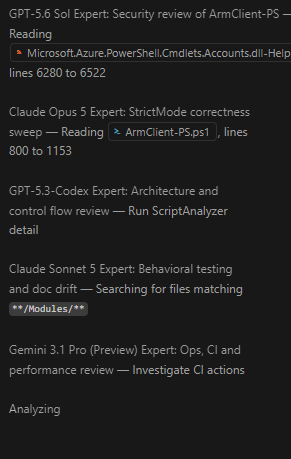
This Tier 4 example shows five configured experts investigating separate concerns in parallel: security, correctness, architecture, testing, and operations. Smaller tasks use fewer experts or no subagents at all.
You can also request a specific workflow when needed:
Debate this design and give me the evidence-based verdict.
Run the full team. Assign security, testing, architecture, implementation,
and operations separate scopes, then return one recommendation.
Use one testing expert to review the regression risk in this change.
Tier 5 is the one tier the coordinator will never choose for itself. It runs only when your message contains an explicit keyword such as brainstorm, deep review, or unconstrained:
Brainstorm this module. I want an unconstrained deep review, not a summary.
The goal is not to maximize the number of agents. It is to use the smallest group that can materially improve the answer.
That restraint is the point of the tier gating. A Tier 4 run puts five frontier models to work in parallel, and a nested review can double a branch. Tier 5 deliberately runs one reviewer behind every expert, so a five-model Tier 5 run can spend ten model calls and return a large synthesis. In practice most requests cost zero or one expert call. Hover a subagent section in the chat response to see the AI credits it actually used.
The other half of the cost is context, and it is easy to miss because nothing bills you for it directly. Everything attached to the request is re-sent on every turn, so a large file left selected in the editor, or pinned as context, is paid for again each time you send a message and again inside every expert the coordinator dispatches. If a long session starts feeling slow or expensive, deselect large files and start a fresh conversation for the next task.
 Interruption and Resume
Sending a steering message mid-run makes the coordinator yield after the tool call that is currently executing, which historically meant a half-finished fan-out was silently abandoned. The coordinator now classifies the interjection instead:
| Classification | Meaning | Behavior |
|---|---|---|
| REDIRECT | The goal itself changed. | Outstanding work is dropped, and the coordinator states what it dropped. |
| REFINEMENT | The goal stands, but the constraints changed. | Valid expert results are kept, and only the invalidated experts are re-dispatched. |
| DETOUR | A genuine side question. | The question is answered, then the original work resumes. |
Above Tier 0, the run is tracked as a todo list with one item per dispatched expert plus one for synthesis. The list is written before the first expert is invoked, which is what makes it durable, because an interruption yields after the tool call that is already running. Results already in the transcript are reused rather than re-dispatched, a branch that stalled is not put back on the queue, and an unfinished turn ends with an explicit outstanding-work block.
Resuming does not cost you a round trip. Being interrupted no longer downgrades an already-authorized edit into a question, so the coordinator continues work you already asked for and reserves the permission prompt for destructive or newly doubtful actions.
If you would rather a run finish before your next message is processed, choose Add to Queue from the Send dropdown, or set chat.requestQueuing.defaultAction to queue.
 Editing Your Code
The coordinator is the only agent with edit and terminal access. Experts and reviewers can read, search, and browse, so a finding always has to pass through the coordinator before anything on disk changes.
When it does change code, it follows the conventions already present in the file rather than its own defaults, including naming, error handling, structure, and test style. A rule stated in a linter config, an .editorconfig, or a contributing guide outranks the model’s preference. Finishing a change also means leaving behind no debugging scaffolding, no commented-out code, and no stub that silently does nothing.
When the coordinator adds a test, it breaks what the test covers, watches the test fail, and then puts the code back. A passing test proves nothing until it has been seen to fail for the right reason.
The removal gate
The coordinator never deletes code it believes is unused as part of a change you asked for. It finishes the task, then raises removal separately and asks first.
Removal is defined by effect rather than by the word delete, because the likeliest evasion is not deleting any text at all. Unexporting, privatizing, renaming, dropping a registration, excluding a file from the build or from discovery, replacing a body with a stub, and letting a formatter or codemod strip something all count. If a symbol was reachable before the change and unreachable after it, the gate applies.
That gate exists because a text search cannot see every caller:
- Reflection, dynamic dispatch, and invocation by name from a string.
- Dependency injection, plugin discovery, and convention-based registration.
- Exported or public API, CLI surface, and consumers outside the repository.
- Serialization, ORM mapping, persisted data, and schema compatibility.
- Build, packaging, CI, and deployment configuration.
- Feature flags, conditional compilation, and other build configurations.
- Generated code, templates, and imports kept only for a side effect.
Code introduced by the current change can be withdrawn freely. A symbol that predates the change stays protected even when the agent’s own edit is what orphaned it, because causing the orphan says nothing about external callers.
When it does ask, the question has required content so your consent can be informed: the path and symbol, whether it predates the change, where the search ran, which of those vectors could not be ruled out, and what breaks if the analysis is wrong. Candidates are approved one at a time, because a bundled “remove these twelve?” is not a question anyone can answer safely.
 Uninstall
The installer writes agent files and one VS Code setting, so removal is manual and complete:
Remove-Item "$HOME\.copilot\agents\multi-model-engineering-council.agent.md"
Remove-Item "$HOME\.copilot\agents\mm-expert-*.agent.md"
Remove-Item "$HOME\.copilot\agents\mm-reviewer-*.agent.md"
Then set chat.subagents.allowInvocationsFromSubagents back to false if you want nested subagents disabled, and reload the window. Timestamped backups remain under ~/.copilot/agent-backups until you delete them.
 License
VS Code AI Council version 5.12.0 is released under the MIT License. The complete license grant and warranty disclaimer are included in the .NOTES section of both the .ps1 and .txt distributions, and in LICENSE in the repository.
 Conclusion
VS Code AI Council turns multiple GitHub Copilot models into an adaptive engineering workflow instead of a permanent panel. Simple work stays simple, complex work can receive focused parallel analysis, and difficult decisions can receive bounded cross-model review.
The installer keeps that structure visible: one coordinator, distinct expert lenses, leaf reviewers, transactional activation with rollback, explicit backups, post-install validation, and no unrestricted recursion. The coordinator keeps its own behavior visible too, announcing what it is about to spend, showing the evidence that settled each conflict, and asking before it removes anything. That balance is what makes the council useful for regular repository work rather than only for demonstrations.
The script, the changelog, and the license are all on GitHub: github.com/blakedrumm/VSCode-AI-Council

Share on: