 Introduction
Microsoft Teams keeps a local cache of messages, images, icons, thumbnails, web cache, IndexedDB data, GPU cache, local storage, and service worker data. Over time this cache can become corrupted or stale, leading to problems like missing presence, blank screens, stuck loading, broken images, or sign-in loops.
The usual fix is to clear the Teams cache so the client can rebuild it fresh. This post covers a PowerShell script that does exactly that—safely—for both Classic Teams and New Teams on Windows.
The script is compatible with both Windows PowerShell 5.1 and PowerShell 7+ on Windows, and it is fully parameter-driven, so you can control its behavior with switches instead of editing the file.
 How to get it
GitHub Repository - Clear-TeamsCache  Project Repository
or
Clear-TeamsCache.ps1 Direct Download Link
You can also download and run the script directly with PowerShell:
Invoke-WebRequest -Uri 'https://raw.githubusercontent.com/blakedrumm/Clear-TeamsCache/main/Clear-TeamsCache.ps1' -OutFile "$env:TEMP\Clear-TeamsCache.ps1"
Disclaimer: Always test in a development environment before applying to production.
By default, the script clears Teams cache for the currently signed-in user only.
 What Gets Cleared
The script targets the following cache roots:
| Teams Type | Cache Root |
|---|---|
| Classic Teams | %AppData%\Microsoft\Teams |
| New Teams | %LocalAppData%\Packages\MSTeams_8wekyb3d8bbwe\LocalCache\Microsoft\MSTeams |
The script is intentionally scoped to Teams client cache paths. It does not clear Windows credentials, browser credentials, Office identity cache, WAM tokens, or OneAuth tokens.
 How It Works
- Verifies it is running on Windows and that the selected options are valid
- Stops running Teams processes (graceful close first, then optional force stop), including Teams-related WebView2 processes
- Builds the list of profiles to process (current user, or all local profiles)
- Runs a safety check on every cache path before touching it
- Removes cache items with retry logic, and an optional robocopy mirror fallback for stubborn folders
- Optionally restarts Teams and writes a summary
 Safety First
Before any deletion, each path is validated with a safety check that:
- Rejects wildcard characters in deletion paths
- Confirms the path ends with a known Classic Teams or New Teams cache suffix
- Refuses to operate on high-level roots like
C:\, the user profile,%AppData%, or%LocalAppData%\Packages
If a path fails this check, the script throws and refuses to continue.
 Parameters
The script uses safe defaults out of the box—running it with no parameters clears the current user’s cache. Behavior is controlled through the parameters below. Most are switches, so the default behavior is enabled unless you opt out with a -Skip... or -Disable... switch.
| Parameter | Type | Description |
|---|---|---|
-ClearAllUserProfiles | Switch | Clear cache for all local profiles. Requires running as Administrator. |
-SkipCurrentUserProfile | Switch | Skip cache cleanup for the signed-in user. |
-SkipClassicTeams | Switch | Skip Classic Teams cache cleanup. |
-SkipNewTeams | Switch | Skip New Teams cache cleanup. |
-SkipStopTeamsBeforeCleanup | Switch | Do not stop Teams before clearing cache. |
-SkipForceStopTeamsProcesses | Switch | Do not force stop Teams if graceful close times out. |
-StopTeamsGracefulTimeoutSeconds | Int (1-300) | Seconds to wait after graceful close before force-stopping. Default 15. |
-SkipTeamsWebView2Processes | Switch | Do not stop Teams-related WebView2 processes. |
-SkipRestartTeamsAfterCleanup | Switch | Do not relaunch Teams when cleanup finishes. |
-DryRunOnly | Switch | Log what would be removed without deleting anything. |
-CreateBackupBeforeCleanup | Switch | Copy cache to a backup folder before deletion. |
-BackupRoot | String | Folder where backups are stored. Defaults to a timestamped folder in %TEMP%. |
-DisableLogFile | Switch | Disable writing a log file. |
-LogFilePath | String | Full path to the log file. Defaults to a timestamped file in %TEMP%. |
-RetryCount | Int (1-20) | Retry attempts for file removal and process stop actions. Default 3. |
-RetryDelaySeconds | Int (1-60) | Seconds to wait between retries. Default 2. |
-DisableRobocopyFallbackForStubbornFolders | Switch | Disable the robocopy mirror fallback. |
-ResetNewTeamsAppPackage | Switch | Reset the New Teams AppX package (current user only). |
 How to Use the Script
1. Save the Script Locally
Save the script as a .ps1 file:
Clear-TeamsCache.ps1
2. Run as the Affected User (Recommended)
For normal use, run the script as the signed-in user who is having Teams problems:
.\Clear-TeamsCache.ps1
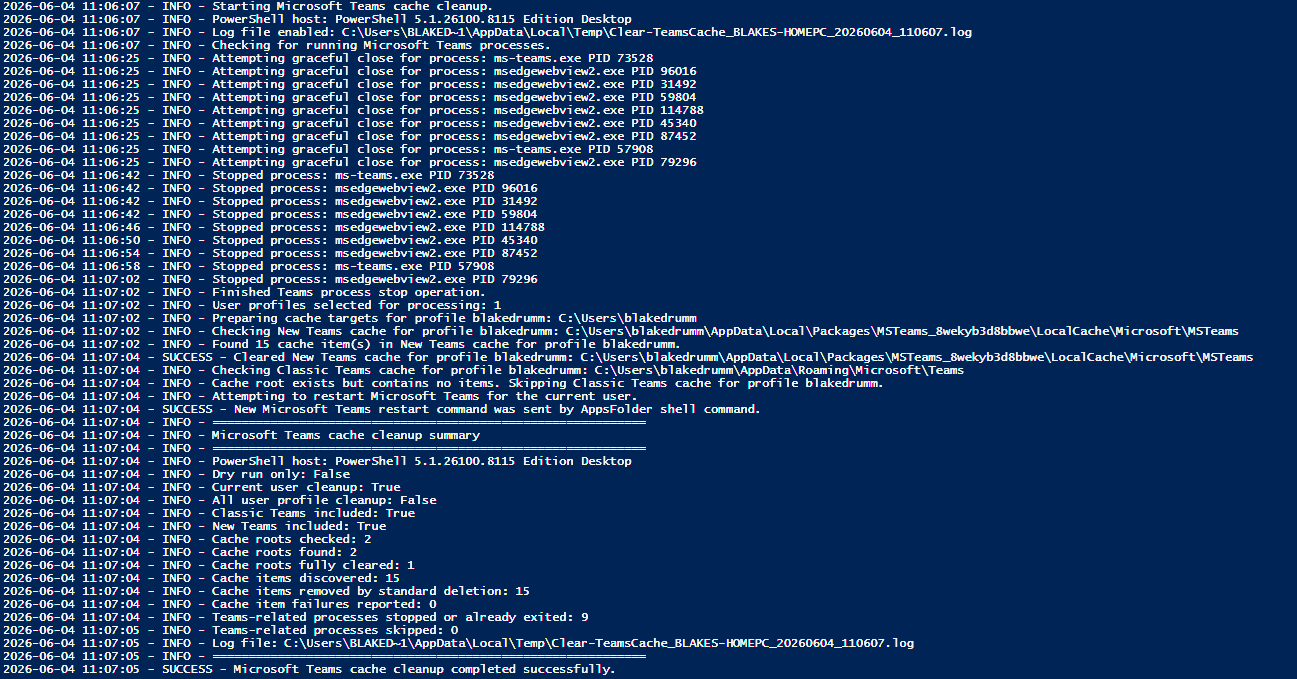
The script will stop Teams, clear the cache, and relaunch Teams for that user.
3. (Optional) Clear All User Profiles
To clear cache for every local profile, run PowerShell as Administrator and use the -ClearAllUserProfiles switch:
.\Clear-TeamsCache.ps1 -ClearAllUserProfiles
 Examples
Preview changes without deleting (Dry Run)
Use -DryRunOnly to see exactly what would be removed:
.\Clear-TeamsCache.ps1 -DryRunOnly
Every cache item will be logged with a Would remove: entry, but nothing is deleted.
Back up the cache before clearing
Use -CreateBackupBeforeCleanup to copy the cache to %TEMP% before deletion:
.\Clear-TeamsCache.ps1 -CreateBackupBeforeCleanup
If the backup fails, cleanup stops so nothing is removed without a safety copy.
Clear only New Teams cache
Use -SkipClassicTeams so only the New Teams cache is processed:
.\Clear-TeamsCache.ps1 -SkipClassicTeams
Clear cache without restarting Teams
Use -SkipRestartTeamsAfterCleanup to leave Teams closed after cleanup:
.\Clear-TeamsCache.ps1 -SkipRestartTeamsAfterCleanup
Reset the New Teams app package
Use -ResetNewTeamsAppPackage to also reset the New Teams AppX package for the current user:
.\Clear-TeamsCache.ps1 -ResetNewTeamsAppPackage
 Logging and Summary
By default the script writes a timestamped log to %TEMP% (for example, Clear-TeamsCache_COMPUTERNAME_yyyyMMdd_HHmmss.log). Use -DisableLogFile to turn this off, or -LogFilePath to choose a custom location.
At the end of every run, a summary reports:
- Cache roots checked, found, and fully cleared
- Cache items discovered, removed, and failed
- Teams-related processes stopped or skipped
- The log file and backup paths (when enabled)
 Things to Know
- After the cache is cleared, Teams may take longer to open the first time while it rebuilds the cache.
- Clearing all user profiles requires Administrator rights.
-
-ResetNewTeamsAppPackageonly applies to the current user and can remove New Teams app data and personalization settings—use with care. - Backups only cover cache folders; AppX reset data is not backed up.
 The Full Script
If you prefer to copy the script directly, the complete contents of Clear-TeamsCache.ps1 are below. This is the same version published in the GitHub repository.
#requires -Version 5.1
<#
.SYNOPSIS
Clears Microsoft Teams cache for Classic Teams and New Teams on Windows.
.DESCRIPTION
This script clears Microsoft Teams cache so Teams can rebuild fresh cached data,
including messages, images, icons, thumbnails, web cache, IndexedDB data, GPU cache,
local storage, service worker cache, and other Teams client cached content.
This script is compatible with:
Windows PowerShell 5.1
PowerShell 7+ on Windows
By default, this script clears Teams cache for the currently signed-in user only.
Supported cache roots cleared by this script:
Classic Teams:
%AppData%\Microsoft\Teams
New Teams:
%LocalAppData%\Packages\MSTeams_8wekyb3d8bbwe\LocalCache\Microsoft\MSTeams
.PARAMETER ClearAllUserProfiles
Clears Teams cache for all local user profiles. Requires PowerShell to be run as Administrator.
.PARAMETER SkipCurrentUserProfile
Skips Teams cache cleanup for the currently signed-in user.
.PARAMETER SkipClassicTeams
Skips Classic Teams cache cleanup.
.PARAMETER SkipNewTeams
Skips New Teams cache cleanup.
.PARAMETER SkipStopTeamsBeforeCleanup
Skips stopping Teams-related processes before cache cleanup.
.PARAMETER SkipForceStopTeamsProcesses
Skips force-stopping Teams-related processes if graceful close does not work.
.PARAMETER StopTeamsGracefulTimeoutSeconds
Number of seconds to wait after graceful close before force-stopping Teams-related processes.
.PARAMETER SkipTeamsWebView2Processes
Skips stopping Teams-related WebView2 processes.
.PARAMETER SkipRestartTeamsAfterCleanup
Skips restarting Teams after cache cleanup completes.
.PARAMETER DryRunOnly
Shows what would be removed without deleting anything.
.PARAMETER CreateBackupBeforeCleanup
Creates a backup of Teams cache contents before removal.
.PARAMETER BackupRoot
Folder where backups are stored when CreateBackupBeforeCleanup is enabled.
.PARAMETER DisableLogFile
Disables logging to a file.
.PARAMETER LogFilePath
Full path to the log file.
.PARAMETER RetryCount
Number of retry attempts for file removal and process stop actions.
.PARAMETER RetryDelaySeconds
Number of seconds to wait between retry attempts.
.PARAMETER DisableRobocopyFallbackForStubbornFolders
Disables robocopy mirror fallback for stubborn cache folders.
.PARAMETER ResetNewTeamsAppPackage
Optional reset of the New Teams AppX package for the current user.
Disabled by default because it can remove New Teams app data and personalization settings.
.EXAMPLE
.\Clear-TeamsCache.ps1
Clears Teams cache for the current user using safe defaults.
.EXAMPLE
.\Clear-TeamsCache.ps1 -DryRunOnly
Shows what would be removed without deleting anything.
.EXAMPLE
.\Clear-TeamsCache.ps1 -ClearAllUserProfiles
Clears Teams cache for all local profiles. Requires Administrator.
.EXAMPLE
.\Clear-TeamsCache.ps1 -CreateBackupBeforeCleanup
Creates a backup before clearing Teams cache.
.EXAMPLE
.\Clear-TeamsCache.ps1 -SkipRestartTeamsAfterCleanup
Clears Teams cache but does not restart Teams afterward.
.EXAMPLE
.\Clear-TeamsCache.ps1 -ResetNewTeamsAppPackage
Clears Teams cache and attempts to reset the New Teams AppX package for the current user.
.LINK
https://github.com/blakedrumm/Clear-TeamsCache
.NOTES
Author: Blake Drumm ([email protected])
Creation Date: June 4th, 2026
Repository: https://github.com/blakedrumm/Clear-TeamsCache
Recommended normal usage:
Run this script as the affected signed-in user.
For all local user profiles:
Run PowerShell as Administrator and use:
.\Clear-TeamsCache.ps1 -ClearAllUserProfiles
This script does not clear Windows credentials, browser credentials, Office identity cache,
WAM tokens, OneAuth tokens, or Microsoft 365 identity data. It is intentionally scoped to
Teams client cache paths.
After Teams cache is cleared, Teams may take longer to open the first time while it rebuilds cache.
#>
[CmdletBinding()]
param (
[Parameter(Mandatory = $false)]
[switch]$ClearAllUserProfiles,
[Parameter(Mandatory = $false)]
[switch]$SkipCurrentUserProfile,
[Parameter(Mandatory = $false)]
[switch]$SkipClassicTeams,
[Parameter(Mandatory = $false)]
[switch]$SkipNewTeams,
[Parameter(Mandatory = $false)]
[switch]$SkipStopTeamsBeforeCleanup,
[Parameter(Mandatory = $false)]
[switch]$SkipForceStopTeamsProcesses,
[Parameter(Mandatory = $false)]
[ValidateRange(1, 300)]
[int]$StopTeamsGracefulTimeoutSeconds = 15,
[Parameter(Mandatory = $false)]
[switch]$SkipTeamsWebView2Processes,
[Parameter(Mandatory = $false)]
[switch]$SkipRestartTeamsAfterCleanup,
[Parameter(Mandatory = $false)]
[switch]$DryRunOnly,
[Parameter(Mandatory = $false)]
[switch]$CreateBackupBeforeCleanup,
[Parameter(Mandatory = $false)]
[string]$BackupRoot = (Join-Path -Path $env:TEMP -ChildPath ("TeamsCacheBackup_{0}" -f (Get-Date -Format 'yyyyMMdd_HHmmss'))),
[Parameter(Mandatory = $false)]
[switch]$DisableLogFile,
[Parameter(Mandatory = $false)]
[string]$LogFilePath = (Join-Path -Path $env:TEMP -ChildPath ("Clear-TeamsCache_{0}_{1}.log" -f $env:COMPUTERNAME, (Get-Date -Format 'yyyyMMdd_HHmmss'))),
[Parameter(Mandatory = $false)]
[ValidateRange(1, 20)]
[int]$RetryCount = 3,
[Parameter(Mandatory = $false)]
[ValidateRange(1, 60)]
[int]$RetryDelaySeconds = 2,
[Parameter(Mandatory = $false)]
[switch]$DisableRobocopyFallbackForStubbornFolders,
[Parameter(Mandatory = $false)]
[switch]$ResetNewTeamsAppPackage,
[Parameter(Mandatory = $false)]
[string[]]$ExcludedProfileFolderNames = @(
'All Users',
'Default',
'Default User',
'Public',
'desktop.ini'
),
[Parameter(Mandatory = $false)]
[string[]]$TeamsExecutableProcessNames = @(
'Teams.exe',
'ms-teams.exe',
'MSTeams.exe'
),
[Parameter(Mandatory = $false)]
[string[]]$TeamsUpdateProcessNames = @(
'Update.exe',
'Squirrel.exe'
),
[Parameter(Mandatory = $false)]
[string[]]$TeamsWebView2ProcessNames = @(
'msedgewebview2.exe'
)
)
$ErrorActionPreference = 'Stop'
$ShouldClearCurrentUserProfile = -not $SkipCurrentUserProfile.IsPresent
$ShouldClearAllUserProfiles = $ClearAllUserProfiles.IsPresent
$ShouldIncludeClassicTeams = -not $SkipClassicTeams.IsPresent
$ShouldIncludeNewTeams = -not $SkipNewTeams.IsPresent
$ShouldStopTeamsBeforeCleanup = -not $SkipStopTeamsBeforeCleanup.IsPresent
$ShouldForceStopTeamsProcesses = -not $SkipForceStopTeamsProcesses.IsPresent
$ShouldStopTeamsWebView2Processes = -not $SkipTeamsWebView2Processes.IsPresent
$ShouldRestartTeamsAfterCleanup = -not $SkipRestartTeamsAfterCleanup.IsPresent
$ShouldDryRunOnly = $DryRunOnly.IsPresent
$ShouldCreateBackupBeforeCleanup = $CreateBackupBeforeCleanup.IsPresent
$ShouldEnableLogFile = -not $DisableLogFile.IsPresent
$ShouldUseRobocopyFallbackForStubbornFolders = -not $DisableRobocopyFallbackForStubbornFolders.IsPresent
$ShouldResetNewTeamsAppPackage = $ResetNewTeamsAppPackage.IsPresent
$script:TotalCacheRootsChecked = 0
$script:TotalCacheRootsFound = 0
$script:TotalCacheRootsCleared = 0
$script:TotalItemsDiscovered = 0
$script:TotalItemsRemoved = 0
$script:TotalItemsFailed = 0
$script:TotalProcessesStopped = 0
$script:TotalProcessesSkipped = 0
function Write-Log {
param (
[Parameter(Mandatory = $true)]
[string]$Message,
[Parameter(Mandatory = $false)]
[ValidateSet('INFO', 'WARN', 'ERROR', 'SUCCESS')]
[string]$Level = 'INFO'
)
$Line = "{0} - {1} - {2}" -f (Get-Date -Format 'yyyy-MM-dd HH:mm:ss'), $Level, $Message
Write-Output $Line
if ($ShouldEnableLogFile) {
try {
$LogFolder = Split-Path -Path $LogFilePath -Parent
if (-not [string]::IsNullOrWhiteSpace($LogFolder) -and -not (Test-Path -LiteralPath $LogFolder)) {
New-Item -Path $LogFolder -ItemType Directory -Force | Out-Null
}
Add-Content -LiteralPath $LogFilePath -Value $Line -Encoding UTF8
}
catch {
Write-Output ("{0} - WARN - Failed to write to log file. Error: {1}" -f (Get-Date -Format 'yyyy-MM-dd HH:mm:ss'), $_.Exception.Message)
}
}
}
function Test-IsWindows {
if ($PSVersionTable.PSVersion.Major -ge 6) {
return $IsWindows
}
return ([System.Environment]::OSVersion.Platform -eq [System.PlatformID]::Win32NT)
}
function Test-IsAdministrator {
$CurrentIdentity = [Security.Principal.WindowsIdentity]::GetCurrent()
$Principal = New-Object Security.Principal.WindowsPrincipal($CurrentIdentity)
return $Principal.IsInRole([Security.Principal.WindowsBuiltInRole]::Administrator)
}
function Get-PowerShellHostDescription {
return "PowerShell {0} Edition {1}" -f $PSVersionTable.PSVersion.ToString(), $PSVersionTable.PSEdition
}
function Get-WindowsPowerShellExePath {
$PowerShellExePath = Join-Path -Path $env:WINDIR -ChildPath 'System32\WindowsPowerShell\v1.0\powershell.exe'
if (Test-Path -LiteralPath $PowerShellExePath) {
return $PowerShellExePath
}
$FallbackPowerShellExePath = Join-Path -Path $env:SystemRoot -ChildPath 'System32\WindowsPowerShell\v1.0\powershell.exe'
if (Test-Path -LiteralPath $FallbackPowerShellExePath) {
return $FallbackPowerShellExePath
}
return $null
}
function Invoke-WindowsPowerShellTextCommand {
param (
[Parameter(Mandatory = $true)]
[string]$CommandText
)
$PowerShellExePath = Get-WindowsPowerShellExePath
if ([string]::IsNullOrWhiteSpace($PowerShellExePath)) {
throw "Windows PowerShell 5.1 executable was not found."
}
$Bytes = [System.Text.Encoding]::Unicode.GetBytes($CommandText)
$EncodedCommand = [Convert]::ToBase64String($Bytes)
$ProcessStartInfo = New-Object System.Diagnostics.ProcessStartInfo
$ProcessStartInfo.FileName = $PowerShellExePath
$ProcessStartInfo.Arguments = "-NoProfile -ExecutionPolicy Bypass -EncodedCommand $EncodedCommand"
$ProcessStartInfo.RedirectStandardOutput = $true
$ProcessStartInfo.RedirectStandardError = $true
$ProcessStartInfo.UseShellExecute = $false
$ProcessStartInfo.CreateNoWindow = $true
$Process = New-Object System.Diagnostics.Process
$Process.StartInfo = $ProcessStartInfo
[void]$Process.Start()
$StandardOutput = $Process.StandardOutput.ReadToEnd()
$StandardError = $Process.StandardError.ReadToEnd()
$Process.WaitForExit()
return [PSCustomObject]@{
ExitCode = $Process.ExitCode
StandardOutput = $StandardOutput
StandardError = $StandardError
}
}
function Get-NewTeamsPackageFullName {
$PackageFullName = $null
$GetAppxPackageCommand = Get-Command -Name Get-AppxPackage -ErrorAction SilentlyContinue
if ($GetAppxPackageCommand) {
try {
$Package = Get-AppxPackage -Name 'MSTeams' -ErrorAction SilentlyContinue | Select-Object -First 1
if ($Package -and $Package.PackageFullName) {
$PackageFullName = $Package.PackageFullName
}
}
catch {
$PackageFullName = $null
}
}
if ([string]::IsNullOrWhiteSpace($PackageFullName)) {
try {
$CommandText = @'
$ErrorActionPreference = 'Stop'
$Package = Get-AppxPackage -Name 'MSTeams' -ErrorAction SilentlyContinue | Select-Object -First 1
if ($Package -and $Package.PackageFullName) {
Write-Output $Package.PackageFullName
}
'@
$Result = Invoke-WindowsPowerShellTextCommand -CommandText $CommandText
if ($Result.ExitCode -eq 0 -and -not [string]::IsNullOrWhiteSpace($Result.StandardOutput)) {
$PackageFullName = ($Result.StandardOutput.Trim() -split "`r?`n" | Select-Object -First 1)
}
}
catch {
$PackageFullName = $null
}
}
return $PackageFullName
}
function Invoke-WithRetry {
param (
[Parameter(Mandatory = $true)]
[scriptblock]$Action,
[Parameter(Mandatory = $true)]
[string]$Description,
[Parameter(Mandatory = $false)]
[int]$MaximumAttempts = $RetryCount,
[Parameter(Mandatory = $false)]
[int]$DelaySeconds = $RetryDelaySeconds
)
for ($Attempt = 1; $Attempt -le $MaximumAttempts; $Attempt++) {
try {
& $Action
return $true
}
catch {
if ($Attempt -ge $MaximumAttempts) {
Write-Log -Level 'ERROR' -Message ("Failed after {0} attempt(s): {1}. Error: {2}" -f $Attempt, $Description, $_.Exception.Message)
return $false
}
Write-Log -Level 'WARN' -Message ("Attempt {0} failed: {1}. Retrying in {2} second(s). Error: {3}" -f $Attempt, $Description, $DelaySeconds, $_.Exception.Message)
Start-Sleep -Seconds $DelaySeconds
}
}
return $false
}
function Get-SafeFullPath {
param (
[Parameter(Mandatory = $true)]
[string]$Path
)
if ([string]::IsNullOrWhiteSpace($Path)) {
throw "Path cannot be empty."
}
if ($Path.Contains('*') -or $Path.Contains('?')) {
throw "Wildcard characters are not allowed in deletion paths: $Path"
}
$FullPath = [System.IO.Path]::GetFullPath($Path)
return $FullPath.TrimEnd('\')
}
function Test-SafeTeamsCacheRoot {
param (
[Parameter(Mandatory = $true)]
[string]$Path
)
try {
$FullPath = Get-SafeFullPath -Path $Path
}
catch {
Write-Log -Level 'ERROR' -Message $_.Exception.Message
return $false
}
$ClassicTeamsSuffix = '\AppData\Roaming\Microsoft\Teams'
$NewTeamsSuffix = '\AppData\Local\Packages\MSTeams_8wekyb3d8bbwe\LocalCache\Microsoft\MSTeams'
$IsClassicTeamsRoot = $FullPath.EndsWith($ClassicTeamsSuffix, [System.StringComparison]::OrdinalIgnoreCase)
$IsNewTeamsRoot = $FullPath.EndsWith($NewTeamsSuffix, [System.StringComparison]::OrdinalIgnoreCase)
if (-not $IsClassicTeamsRoot -and -not $IsNewTeamsRoot) {
return $false
}
$InvalidRoots = @(
'',
'\',
'C:',
'C:\',
$env:SystemDrive,
"$env:SystemDrive\",
$env:USERPROFILE,
$env:APPDATA,
$env:LOCALAPPDATA,
"$env:LOCALAPPDATA\Packages",
"$env:APPDATA\Microsoft"
) | Where-Object {
-not [string]::IsNullOrWhiteSpace($_)
} | ForEach-Object {
try {
Get-SafeFullPath -Path $_
}
catch {
$null
}
}
foreach ($InvalidRoot in $InvalidRoots) {
if ($FullPath.Equals($InvalidRoot, [System.StringComparison]::OrdinalIgnoreCase)) {
return $false
}
}
return $true
}
function Get-CurrentUserSid {
return [Security.Principal.WindowsIdentity]::GetCurrent().User.Value
}
function Get-ProcessOwnerSid {
param (
[Parameter(Mandatory = $true)]
[Microsoft.Management.Infrastructure.CimInstance]$CimProcess
)
try {
$OwnerSid = Invoke-CimMethod -InputObject $CimProcess -MethodName GetOwnerSid -ErrorAction Stop
if ($OwnerSid -and $OwnerSid.Sid) {
return $OwnerSid.Sid
}
}
catch {
return $null
}
return $null
}
function Test-IsTeamsRelatedProcess {
param (
[Parameter(Mandatory = $true)]
[Microsoft.Management.Infrastructure.CimInstance]$CimProcess
)
$Name = $CimProcess.Name
$NameLower = $Name.ToLowerInvariant()
$CommandLine = ''
$ExecutablePath = ''
if ($CimProcess.CommandLine) {
$CommandLine = $CimProcess.CommandLine
}
if ($CimProcess.ExecutablePath) {
$ExecutablePath = $CimProcess.ExecutablePath
}
$CombinedText = "{0} {1}" -f $CommandLine, $ExecutablePath
foreach ($ProcessName in $TeamsExecutableProcessNames) {
if ($NameLower -eq $ProcessName.ToLowerInvariant()) {
return $true
}
}
foreach ($ProcessName in $TeamsUpdateProcessNames) {
if ($NameLower -eq $ProcessName.ToLowerInvariant()) {
if ($CombinedText -match '(?i)\\Microsoft\\Teams\\|\\AppData\\Local\\Microsoft\\Teams\\|MSTeams_8wekyb3d8bbwe|Microsoft Teams') {
return $true
}
}
}
if ($ShouldStopTeamsWebView2Processes) {
foreach ($ProcessName in $TeamsWebView2ProcessNames) {
if ($NameLower -eq $ProcessName.ToLowerInvariant()) {
if ($CombinedText -match '(?i)MSTeams_8wekyb3d8bbwe|\\Microsoft\\Teams\\|ms-teams|msteams|teams\.microsoft\.com') {
return $true
}
}
}
}
return $false
}
function Stop-TeamsProcesses {
param (
[Parameter(Mandatory = $true)]
[bool]$AllUsers
)
Write-Log "Checking for running Microsoft Teams processes."
$CurrentUserSid = Get-CurrentUserSid
$CimProcesses = @(Get-CimInstance -ClassName Win32_Process -ErrorAction SilentlyContinue | Where-Object {
Test-IsTeamsRelatedProcess -CimProcess $_
})
if (-not $CimProcesses -or $CimProcesses.Count -eq 0) {
Write-Log "No running Teams-related processes were found."
return
}
$ProcessTargets = New-Object System.Collections.Generic.List[object]
foreach ($CimProcess in $CimProcesses) {
$OwnerSid = Get-ProcessOwnerSid -CimProcess $CimProcess
if (-not $AllUsers) {
if ([string]::IsNullOrWhiteSpace($OwnerSid)) {
Write-Log -Level 'WARN' -Message ("Skipping process because owner SID could not be determined: {0} PID {1}" -f $CimProcess.Name, $CimProcess.ProcessId)
$script:TotalProcessesSkipped++
continue
}
if (-not $OwnerSid.Equals($CurrentUserSid, [System.StringComparison]::OrdinalIgnoreCase)) {
Write-Log -Level 'INFO' -Message ("Skipping Teams-related process from another user: {0} PID {1}" -f $CimProcess.Name, $CimProcess.ProcessId)
$script:TotalProcessesSkipped++
continue
}
}
$ProcessTargets.Add([PSCustomObject]@{
ProcessId = [int]$CimProcess.ProcessId
Name = [string]$CimProcess.Name
OwnerSid = [string]$OwnerSid
ExecutablePath = [string]$CimProcess.ExecutablePath
CommandLine = [string]$CimProcess.CommandLine
})
}
if ($ProcessTargets.Count -eq 0) {
Write-Log "No Teams-related processes matched the selected cleanup scope."
return
}
foreach ($Target in $ProcessTargets) {
try {
$Process = Get-Process -Id $Target.ProcessId -ErrorAction Stop
Write-Log ("Attempting graceful close for process: {0} PID {1}" -f $Target.Name, $Target.ProcessId)
if ($Process.MainWindowHandle -ne 0) {
[void]$Process.CloseMainWindow()
}
}
catch {
Write-Log -Level 'WARN' -Message ("Graceful close was not available for process: {0} PID {1}. Error: {2}" -f $Target.Name, $Target.ProcessId, $_.Exception.Message)
}
}
$Stopwatch = [Diagnostics.Stopwatch]::StartNew()
do {
Start-Sleep -Seconds 1
$StillRunning = @()
foreach ($Target in $ProcessTargets) {
$ExistingProcess = Get-Process -Id $Target.ProcessId -ErrorAction SilentlyContinue
if ($ExistingProcess) {
$StillRunning += $Target
}
}
}
while ($StillRunning.Count -gt 0 -and $Stopwatch.Elapsed.TotalSeconds -lt $StopTeamsGracefulTimeoutSeconds)
$Stopwatch.Stop()
$StillRunning = @()
foreach ($Target in $ProcessTargets) {
$ExistingProcess = Get-Process -Id $Target.ProcessId -ErrorAction SilentlyContinue
if ($ExistingProcess) {
$StillRunning += $Target
}
}
if ($StillRunning.Count -gt 0 -and $ShouldForceStopTeamsProcesses) {
foreach ($Target in $StillRunning) {
$Stopped = Invoke-WithRetry -Description ("Force stop process {0} PID {1}" -f $Target.Name, $Target.ProcessId) -Action {
Stop-Process -Id $Target.ProcessId -Force -ErrorAction Stop
}
if ($Stopped) {
Write-Log ("Stopped process: {0} PID {1}" -f $Target.Name, $Target.ProcessId)
$script:TotalProcessesStopped++
}
else {
$script:TotalProcessesSkipped++
}
}
}
elseif ($StillRunning.Count -gt 0) {
throw "One or more Teams-related processes are still running. Close Teams and rerun the script, or rerun without -SkipForceStopTeamsProcesses."
}
foreach ($Target in $ProcessTargets) {
$ExistingProcess = Get-Process -Id $Target.ProcessId -ErrorAction SilentlyContinue
if (-not $ExistingProcess) {
if ($script:TotalProcessesStopped -lt $ProcessTargets.Count) {
$script:TotalProcessesStopped++
}
}
}
Write-Log "Finished Teams process stop operation."
}
function Get-LocalUserProfiles {
$Profiles = @()
try {
$CimProfiles = @(Get-CimInstance -ClassName Win32_UserProfile -ErrorAction Stop | Where-Object {
$_.Special -eq $false -and
-not [string]::IsNullOrWhiteSpace($_.LocalPath) -and
(Test-Path -LiteralPath $_.LocalPath)
})
foreach ($CimProfile in $CimProfiles) {
$ProfileName = Split-Path -Path $CimProfile.LocalPath -Leaf
if ($ExcludedProfileFolderNames -contains $ProfileName) {
continue
}
$Profiles += [PSCustomObject]@{
ProfileName = $ProfileName
ProfilePath = $CimProfile.LocalPath
Source = 'Win32_UserProfile'
}
}
}
catch {
Write-Log -Level 'WARN' -Message ("Unable to query Win32_UserProfile. Falling back to C:\Users. Error: {0}" -f $_.Exception.Message)
}
if (-not $Profiles -or $Profiles.Count -eq 0) {
$UsersRoot = Join-Path -Path $env:SystemDrive -ChildPath 'Users'
if (Test-Path -LiteralPath $UsersRoot) {
$ProfileFolders = @(Get-ChildItem -LiteralPath $UsersRoot -Directory -Force -ErrorAction Stop | Where-Object {
$ExcludedProfileFolderNames -notcontains $_.Name
})
foreach ($ProfileFolder in $ProfileFolders) {
$Profiles += [PSCustomObject]@{
ProfileName = $ProfileFolder.Name
ProfilePath = $ProfileFolder.FullName
Source = 'FolderEnumeration'
}
}
}
}
$Profiles = @($Profiles | Sort-Object -Property ProfilePath -Unique)
return $Profiles
}
function Get-TeamsCacheTargetsForProfile {
param (
[Parameter(Mandatory = $true)]
[string]$ProfilePath,
[Parameter(Mandatory = $true)]
[string]$ProfileName
)
$Targets = @()
if ($ShouldIncludeClassicTeams) {
$Targets += [PSCustomObject]@{
ProfileName = $ProfileName
ProfilePath = $ProfilePath
TeamsType = 'Classic Teams'
CacheRoot = Join-Path -Path $ProfilePath -ChildPath 'AppData\Roaming\Microsoft\Teams'
}
}
if ($ShouldIncludeNewTeams) {
$Targets += [PSCustomObject]@{
ProfileName = $ProfileName
ProfilePath = $ProfilePath
TeamsType = 'New Teams'
CacheRoot = Join-Path -Path $ProfilePath -ChildPath 'AppData\Local\Packages\MSTeams_8wekyb3d8bbwe\LocalCache\Microsoft\MSTeams'
}
}
return $Targets
}
function Backup-TeamsCacheRoot {
param (
[Parameter(Mandatory = $true)]
[string]$CacheRoot,
[Parameter(Mandatory = $true)]
[string]$ProfileName,
[Parameter(Mandatory = $true)]
[string]$TeamsType
)
if (-not (Test-Path -LiteralPath $CacheRoot)) {
return $true
}
$SafeProfileName = $ProfileName -replace '[\\/:*?"<>|]', '_'
$SafeTeamsType = $TeamsType -replace '[\\/:*?"<>|]', '_'
$BackupDestination = Join-Path -Path $BackupRoot -ChildPath (Join-Path -Path $SafeProfileName -ChildPath $SafeTeamsType)
try {
if (-not (Test-Path -LiteralPath $BackupDestination)) {
New-Item -Path $BackupDestination -ItemType Directory -Force | Out-Null
}
$Items = @(Get-ChildItem -LiteralPath $CacheRoot -Force -ErrorAction Stop)
foreach ($Item in $Items) {
Copy-Item -LiteralPath $Item.FullName -Destination $BackupDestination -Recurse -Force -ErrorAction Stop
}
Write-Log ("Backup completed for {0} cache in profile {1}: {2}" -f $TeamsType, $ProfileName, $BackupDestination)
return $true
}
catch {
Write-Log -Level 'ERROR' -Message ("Backup failed for {0} cache in profile {1}. Error: {2}" -f $TeamsType, $ProfileName, $_.Exception.Message)
return $false
}
}
function Clear-FolderUsingRobocopyMirror {
param (
[Parameter(Mandatory = $true)]
[string]$CacheRoot
)
if (-not $ShouldUseRobocopyFallbackForStubbornFolders) {
return $false
}
if (-not (Test-SafeTeamsCacheRoot -Path $CacheRoot)) {
Write-Log -Level 'ERROR' -Message ("Robocopy fallback blocked by safety check: {0}" -f $CacheRoot)
return $false
}
$RobocopyPath = Join-Path -Path $env:SystemRoot -ChildPath 'System32\robocopy.exe'
if (-not (Test-Path -LiteralPath $RobocopyPath)) {
Write-Log -Level 'WARN' -Message "Robocopy was not found. Fallback cleanup cannot be used."
return $false
}
$EmptyFolder = Join-Path -Path $env:TEMP -ChildPath ("EmptyTeamsCacheMirror_{0}" -f ([guid]::NewGuid().Guid))
try {
New-Item -Path $EmptyFolder -ItemType Directory -Force | Out-Null
$ArgumentString = '"{0}" "{1}" /MIR /R:{2} /W:{3} /NFL /NDL /NJH /NJS /NC /NS /NP' -f $EmptyFolder, $CacheRoot, $RetryCount, $RetryDelaySeconds
Write-Log ("Running robocopy fallback cleanup for: {0}" -f $CacheRoot)
$RobocopyProcess = Start-Process -FilePath $RobocopyPath -ArgumentList $ArgumentString -NoNewWindow -Wait -PassThru
if ($RobocopyProcess.ExitCode -le 7) {
Write-Log -Level 'SUCCESS' -Message ("Robocopy fallback completed successfully. Exit code: {0}" -f $RobocopyProcess.ExitCode)
return $true
}
Write-Log -Level 'ERROR' -Message ("Robocopy fallback failed. Exit code: {0}" -f $RobocopyProcess.ExitCode)
return $false
}
catch {
Write-Log -Level 'ERROR' -Message ("Robocopy fallback failed. Error: {0}" -f $_.Exception.Message)
return $false
}
finally {
try {
if (Test-Path -LiteralPath $EmptyFolder) {
Remove-Item -LiteralPath $EmptyFolder -Recurse -Force -ErrorAction SilentlyContinue
}
}
catch {
Write-Log -Level 'WARN' -Message ("Failed to remove temporary robocopy mirror folder: {0}" -f $EmptyFolder)
}
}
}
function Clear-TeamsCacheRoot {
param (
[Parameter(Mandatory = $true)]
[string]$CacheRoot,
[Parameter(Mandatory = $true)]
[string]$ProfileName,
[Parameter(Mandatory = $true)]
[string]$TeamsType
)
$script:TotalCacheRootsChecked++
Write-Log ("Checking {0} cache for profile {1}: {2}" -f $TeamsType, $ProfileName, $CacheRoot)
if (-not (Test-SafeTeamsCacheRoot -Path $CacheRoot)) {
throw "Safety check failed. Refusing to clear unexpected path: $CacheRoot"
}
if (-not (Test-Path -LiteralPath $CacheRoot)) {
Write-Log ("Cache root was not found. Skipping {0} cache for profile {1}." -f $TeamsType, $ProfileName)
return
}
$script:TotalCacheRootsFound++
$Items = @(Get-ChildItem -LiteralPath $CacheRoot -Force -ErrorAction SilentlyContinue)
if (-not $Items -or $Items.Count -eq 0) {
Write-Log ("Cache root exists but contains no items. Skipping {0} cache for profile {1}." -f $TeamsType, $ProfileName)
return
}
$script:TotalItemsDiscovered += $Items.Count
Write-Log ("Found {0} cache item(s) in {1} cache for profile {2}." -f $Items.Count, $TeamsType, $ProfileName)
if ($ShouldDryRunOnly) {
foreach ($Item in $Items) {
Write-Log ("Dry run only. Would remove: {0}" -f $Item.FullName)
}
return
}
if ($ShouldCreateBackupBeforeCleanup) {
$BackupSuccessful = Backup-TeamsCacheRoot -CacheRoot $CacheRoot -ProfileName $ProfileName -TeamsType $TeamsType
if (-not $BackupSuccessful) {
throw "Backup failed. Cleanup stopped because -CreateBackupBeforeCleanup is enabled."
}
}
$AnyFailures = $false
foreach ($Item in $Items) {
$RemoveDescription = "Remove cache item $($Item.FullName)"
$Removed = Invoke-WithRetry -Description $RemoveDescription -Action {
Remove-Item -LiteralPath $Item.FullName -Recurse -Force -ErrorAction Stop
}
if ($Removed) {
$script:TotalItemsRemoved++
}
else {
$AnyFailures = $true
$script:TotalItemsFailed++
}
}
$RemainingItems = @(Get-ChildItem -LiteralPath $CacheRoot -Force -ErrorAction SilentlyContinue)
if ($RemainingItems.Count -gt 0 -and $ShouldUseRobocopyFallbackForStubbornFolders) {
Write-Log -Level 'WARN' -Message ("{0} item(s) remain after standard deletion. Trying robocopy fallback." -f $RemainingItems.Count)
$FallbackSucceeded = Clear-FolderUsingRobocopyMirror -CacheRoot $CacheRoot
if ($FallbackSucceeded) {
$RemainingAfterFallback = @(Get-ChildItem -LiteralPath $CacheRoot -Force -ErrorAction SilentlyContinue)
if ($RemainingAfterFallback.Count -eq 0) {
$script:TotalCacheRootsCleared++
Write-Log -Level 'SUCCESS' -Message ("Cleared {0} cache for profile {1}: {2}" -f $TeamsType, $ProfileName, $CacheRoot)
return
}
Write-Log -Level 'ERROR' -Message ("Robocopy fallback completed, but {0} item(s) still remain in: {1}" -f $RemainingAfterFallback.Count, $CacheRoot)
$script:TotalItemsFailed += $RemainingAfterFallback.Count
return
}
}
$RemainingItems = @(Get-ChildItem -LiteralPath $CacheRoot -Force -ErrorAction SilentlyContinue)
if ($RemainingItems.Count -eq 0) {
$script:TotalCacheRootsCleared++
Write-Log -Level 'SUCCESS' -Message ("Cleared {0} cache for profile {1}: {2}" -f $TeamsType, $ProfileName, $CacheRoot)
}
else {
Write-Log -Level 'ERROR' -Message ("Cleanup completed with remaining items. Remaining item count: {0}. Path: {1}" -f $RemainingItems.Count, $CacheRoot)
foreach ($RemainingItem in $RemainingItems) {
Write-Log -Level 'WARN' -Message ("Remaining item: {0}" -f $RemainingItem.FullName)
}
if (-not $AnyFailures) {
$script:TotalItemsFailed += $RemainingItems.Count
}
}
}
function Reset-NewTeamsAppPackageForCurrentUser {
if (-not $ShouldResetNewTeamsAppPackage) {
return
}
if ($ShouldClearAllUserProfiles) {
Write-Log -Level 'WARN' -Message "New Teams AppX reset is only supported by this script for the current user. Skipping AppX reset because all-user cleanup is enabled."
return
}
Write-Log -Level 'WARN' -Message "ResetNewTeamsAppPackage is enabled. This can remove New Teams app data and personalization settings for the current user."
$PackageFullName = Get-NewTeamsPackageFullName
if ([string]::IsNullOrWhiteSpace($PackageFullName)) {
Write-Log "New Teams AppX package was not found for the current user. Skipping AppX reset."
return
}
if ($ShouldDryRunOnly) {
Write-Log ("Dry run only. Would reset AppX package: {0}" -f $PackageFullName)
return
}
$ResetAppxPackageCommand = Get-Command -Name Reset-AppxPackage -ErrorAction SilentlyContinue
if ($ResetAppxPackageCommand) {
$ResetSucceeded = Invoke-WithRetry -Description ("Reset AppX package {0}" -f $PackageFullName) -Action {
Reset-AppxPackage -Package $PackageFullName -ErrorAction Stop
}
if ($ResetSucceeded) {
Write-Log -Level 'SUCCESS' -Message ("Reset New Teams AppX package for current user: {0}" -f $PackageFullName)
return
}
}
try {
$CommandText = @"
`$ErrorActionPreference = 'Stop'
Reset-AppxPackage -Package '$PackageFullName'
"@
$Result = Invoke-WindowsPowerShellTextCommand -CommandText $CommandText
if ($Result.ExitCode -eq 0) {
Write-Log -Level 'SUCCESS' -Message ("Reset New Teams AppX package for current user by Windows PowerShell fallback: {0}" -f $PackageFullName)
return
}
Write-Log -Level 'ERROR' -Message ("Windows PowerShell fallback failed to reset New Teams AppX package. Exit code: {0}. Error: {1}" -f $Result.ExitCode, $Result.StandardError.Trim())
}
catch {
Write-Log -Level 'ERROR' -Message ("Unable to reset New Teams AppX package. Error: {0}" -f $_.Exception.Message)
}
}
function Start-MicrosoftTeams {
if (-not $ShouldRestartTeamsAfterCleanup) {
Write-Log "Restart after cleanup was skipped. Teams will not be restarted automatically."
return
}
if ($ShouldDryRunOnly) {
Write-Log "Dry run only. Teams will not be restarted."
return
}
if ($ShouldClearAllUserProfiles -and -not $ShouldClearCurrentUserProfile) {
Write-Log -Level 'WARN' -Message "All-user cleanup was selected without current-user cleanup. Teams will not be restarted automatically."
return
}
Write-Log "Attempting to restart Microsoft Teams for the current user."
$StartedTeams = $false
try {
Start-Process -FilePath 'explorer.exe' -ArgumentList 'shell:AppsFolder\MSTeams_8wekyb3d8bbwe!MSTeams' -ErrorAction Stop
$StartedTeams = $true
Write-Log -Level 'SUCCESS' -Message "New Microsoft Teams restart command was sent by AppsFolder shell command."
}
catch {
Write-Log -Level 'WARN' -Message ("Unable to start New Microsoft Teams by AppsFolder shell command. Error: {0}" -f $_.Exception.Message)
}
if (-not $StartedTeams) {
try {
$CmdExePath = Join-Path -Path $env:SystemRoot -ChildPath 'System32\cmd.exe'
if (Test-Path -LiteralPath $CmdExePath) {
Start-Process -FilePath $CmdExePath -ArgumentList '/c start "" "msteams:"' -WindowStyle Hidden -ErrorAction Stop
$StartedTeams = $true
Write-Log -Level 'SUCCESS' -Message "New Microsoft Teams restart command was sent using msteams protocol."
}
}
catch {
Write-Log -Level 'WARN' -Message ("Unable to start New Microsoft Teams by msteams protocol. Error: {0}" -f $_.Exception.Message)
}
}
if (-not $StartedTeams) {
$ClassicTeamsUpdateExe = Join-Path -Path $env:LOCALAPPDATA -ChildPath 'Microsoft\Teams\Update.exe'
if (Test-Path -LiteralPath $ClassicTeamsUpdateExe) {
try {
Start-Process -FilePath $ClassicTeamsUpdateExe -ArgumentList '--processStart "Teams.exe"' -ErrorAction Stop
$StartedTeams = $true
Write-Log -Level 'SUCCESS' -Message "Classic Microsoft Teams restart command was sent."
}
catch {
Write-Log -Level 'WARN' -Message ("Unable to start Classic Microsoft Teams. Error: {0}" -f $_.Exception.Message)
}
}
}
if (-not $StartedTeams) {
Write-Log -Level 'WARN' -Message "Teams was not restarted automatically. Open Microsoft Teams manually."
}
}
function Write-Summary {
Write-Log "============================================================"
Write-Log "Microsoft Teams cache cleanup summary"
Write-Log "============================================================"
Write-Log ("PowerShell host: {0}" -f (Get-PowerShellHostDescription))
Write-Log ("Dry run only: {0}" -f $ShouldDryRunOnly)
Write-Log ("Current user cleanup: {0}" -f $ShouldClearCurrentUserProfile)
Write-Log ("All user profile cleanup: {0}" -f $ShouldClearAllUserProfiles)
Write-Log ("Classic Teams included: {0}" -f $ShouldIncludeClassicTeams)
Write-Log ("New Teams included: {0}" -f $ShouldIncludeNewTeams)
Write-Log ("Cache roots checked: {0}" -f $script:TotalCacheRootsChecked)
Write-Log ("Cache roots found: {0}" -f $script:TotalCacheRootsFound)
Write-Log ("Cache roots fully cleared: {0}" -f $script:TotalCacheRootsCleared)
Write-Log ("Cache items discovered: {0}" -f $script:TotalItemsDiscovered)
Write-Log ("Cache items removed by standard deletion: {0}" -f $script:TotalItemsRemoved)
Write-Log ("Cache item failures reported: {0}" -f $script:TotalItemsFailed)
Write-Log ("Teams-related processes stopped or already exited: {0}" -f $script:TotalProcessesStopped)
Write-Log ("Teams-related processes skipped: {0}" -f $script:TotalProcessesSkipped)
if ($ShouldEnableLogFile) {
Write-Log ("Log file: {0}" -f $LogFilePath)
}
if ($ShouldCreateBackupBeforeCleanup) {
Write-Log ("Backup root: {0}" -f $BackupRoot)
}
Write-Log "============================================================"
}
try {
Write-Log "Starting Microsoft Teams cache cleanup."
Write-Log ("PowerShell host: {0}" -f (Get-PowerShellHostDescription))
if (-not (Test-IsWindows)) {
throw "This script is intended for Windows only."
}
if (-not $ShouldClearCurrentUserProfile -and -not $ShouldClearAllUserProfiles) {
throw "Nothing to do. Do not use -SkipCurrentUserProfile unless also using -ClearAllUserProfiles."
}
if (-not $ShouldIncludeClassicTeams -and -not $ShouldIncludeNewTeams) {
throw "Nothing to do. Do not use both -SkipClassicTeams and -SkipNewTeams."
}
if ($ShouldClearAllUserProfiles -and -not (Test-IsAdministrator)) {
throw "Clearing all user profiles requires PowerShell to be run as Administrator."
}
if ($ShouldResetNewTeamsAppPackage -and $ShouldCreateBackupBeforeCleanup) {
Write-Log -Level 'WARN' -Message "Backup only covers cache folders. AppX reset data is not backed up by this script."
}
if ($ShouldEnableLogFile) {
Write-Log ("Log file enabled: {0}" -f $LogFilePath)
}
if ($ShouldDryRunOnly) {
Write-Log -Level 'WARN' -Message "DryRunOnly is enabled. No cache files or folders will be removed."
}
if ($ShouldStopTeamsBeforeCleanup) {
Stop-TeamsProcesses -AllUsers:$ShouldClearAllUserProfiles
}
else {
Write-Log -Level 'WARN' -Message "Stopping Teams before cleanup was skipped. Locked cache files may remain."
}
$ProfilesToProcess = @()
$CurrentUserSid = Get-CurrentUserSid
$CurrentProfilePath = $env:USERPROFILE
$CurrentProfileName = Split-Path -Path $CurrentProfilePath -Leaf
if ($ShouldClearCurrentUserProfile) {
if ([string]::IsNullOrWhiteSpace($CurrentProfilePath) -or -not (Test-Path -LiteralPath $CurrentProfilePath)) {
throw "Current user profile path was not found."
}
$ProfilesToProcess += [PSCustomObject]@{
ProfileName = $CurrentProfileName
ProfilePath = $CurrentProfilePath
Source = 'CurrentUser'
}
}
if ($ShouldClearAllUserProfiles) {
$AllProfiles = @(Get-LocalUserProfiles)
foreach ($Profile in $AllProfiles) {
if ($SkipCurrentUserProfile.IsPresent) {
if ($Profile.ProfilePath.Equals($CurrentProfilePath, [System.StringComparison]::OrdinalIgnoreCase)) {
Write-Log ("Skipping current user profile because -SkipCurrentUserProfile was used: {0}" -f $Profile.ProfilePath)
continue
}
}
$ProfilesToProcess += $Profile
}
}
$ProfilesToProcess = @($ProfilesToProcess | Sort-Object -Property ProfilePath -Unique)
if (-not $ProfilesToProcess -or $ProfilesToProcess.Count -eq 0) {
throw "No user profiles were selected for processing."
}
Write-Log ("User profiles selected for processing: {0}" -f $ProfilesToProcess.Count)
$CacheTargets = @()
foreach ($Profile in $ProfilesToProcess) {
Write-Log ("Preparing cache targets for profile {0}: {1}" -f $Profile.ProfileName, $Profile.ProfilePath)
$CacheTargets += Get-TeamsCacheTargetsForProfile -ProfilePath $Profile.ProfilePath -ProfileName $Profile.ProfileName
}
$CacheTargets = @($CacheTargets | Sort-Object -Property CacheRoot -Unique)
foreach ($Target in $CacheTargets) {
Clear-TeamsCacheRoot -CacheRoot $Target.CacheRoot -ProfileName $Target.ProfileName -TeamsType $Target.TeamsType
}
Reset-NewTeamsAppPackageForCurrentUser
Start-MicrosoftTeams
Write-Summary
if ($script:TotalItemsFailed -gt 0) {
Write-Log -Level 'WARN' -Message "Cleanup completed, but one or more items could not be removed. Review the log output above."
}
else {
Write-Log -Level 'SUCCESS' -Message "Microsoft Teams cache cleanup completed successfully."
}
}
catch {
Write-Log -Level 'ERROR' -Message ("Microsoft Teams cache cleanup failed. Error: {0}" -f $_.Exception.Message)
Write-Summary
throw
}
 Share Your Experience
Have you run into Teams cache issues that this script fixed—or one it didn’t? Let me know how you handle Teams cache cleanup at scale!

Share on: