Contents
 Introduction
When using Azure Automation to send emails through Azure Communication Services (ACS), the Automation Account’s managed identity must have the correct RBAC role assigned on the ACS resource. A missing or incorrect role assignment is one of the most common causes of email send failures from runbooks.
Troubleshooting this manually involves checking:
- Whether the system-assigned managed identity is enabled
- Whether the correct role is assigned directly on the ACS resource or inherited through the scope chain
- Whether the identity can acquire an ACS access token
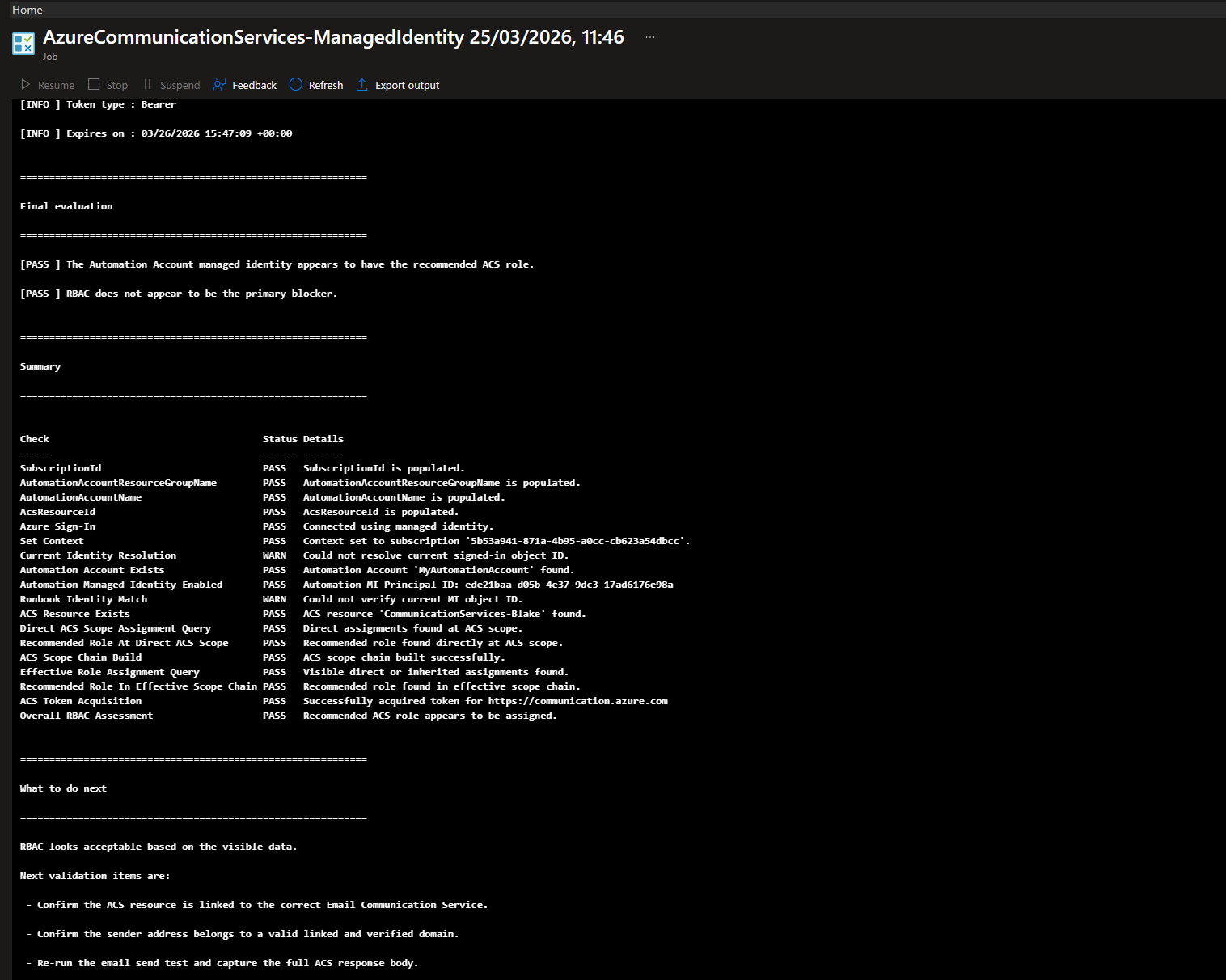
To simplify this process, I built a PowerShell validation script that performs all of these checks automatically and produces a structured summary with clear pass/fail/warn results and remediation steps.
This post explains how the script works, how to run it, and what each validation step checks.
 How to get it
You can get a copy of the script used in this article here:
Check-ACSManagedIdentityAzureAutomationPermissions.ps1  Direct Download Link
or
Check-ACSManagedIdentityAzureAutomationPermissions.txt Text Format Alternative Download Link
 What the Script Does
This script validates that an Azure Automation Account’s system-assigned managed identity has the necessary RBAC access to an Azure Communication Services resource.
Key capabilities include:
- Multiple ACS resource resolution modes — by full Resource ID, by name and resource group, or by name with automatic subscription-wide discovery
- Automation Account managed identity validation — confirms the identity is enabled and has a principal ID
- Direct RBAC assignment check — queries role assignments scoped directly to the ACS resource
- Effective scope chain check — walks the full scope hierarchy (resource → resource group → subscription) to find inherited assignments
- Recommended role validation — confirms whether the Communication and Email Service Owner role is present
-
ACS access token test — attempts to acquire a token for
https://communication.azure.com - Structured summary output — produces a pass/fail/warn results table with remediation guidance
- Dual environment support — works from Azure Automation (managed identity) and from workstations or Cloud Shell (interactive sign-in)
 Prerequisites
Before running the script, ensure the following requirements are met:
-
Az PowerShell modules installed:
Az.AccountsAz.ResourcesAz.Automation
- An Azure Automation Account with a system-assigned managed identity enabled
- An Azure Communication Services resource deployed in the target subscription
- Sufficient permissions to read RBAC role assignments (e.g., Reader on the subscription)
 Argument List
| Parameter | Mandatory | Type | Description |
|---|---|---|---|
| SubscriptionId | Yes | String | The Azure subscription ID containing the resources. |
| AutomationAccountResourceGroupName | Yes | String | The resource group containing the Automation Account. |
| AutomationAccountName | Yes | String | The name of the Automation Account. |
| AcsResourceName | No | String | The name of the ACS resource. Required if AcsResourceId is not supplied. |
| AcsResourceGroupName | No | String | The resource group containing the ACS resource. Optional — if omitted, the script will auto-discover the ACS resource by name across the subscription. |
| AcsResourceId | No | String | The full Azure Resource ID of the ACS resource. If provided, this takes priority over name-based resolution. |
| RecommendedRoleName | No | String | The RBAC role name to check for. Defaults to Communication and Email Service Owner. |
Note
Either
AcsResourceIdorAcsResourceNamemust be provided. If onlyAcsResourceNameis supplied withoutAcsResourceGroupName, the script will search for the ACS resource across the entire subscription.
 How to use it
Example 1 — ACS resource name only (auto-discovery)
.\Check-ACSManagedIdentityAzureAutomationPermissions.ps1 `
    -SubscriptionId "00000000-0000-0000-0000-000000000000" `
    -AutomationAccountResourceGroupName "RG-AUTOMATION" `
    -AutomationAccountName "my-automation-account" `
    -AcsResourceName "my-acs-resource"
Example 2 — ACS resource name with ACS resource group
.\Check-ACSManagedIdentityAzureAutomationPermissions.ps1 `
    -SubscriptionId "00000000-0000-0000-0000-000000000000" `
    -AutomationAccountResourceGroupName "RG-AUTOMATION" `
    -AutomationAccountName "my-automation-account" `
    -AcsResourceName "my-acs-resource" `
    -AcsResourceGroupName "RG-ACS"
Example 3 — Full ACS Resource ID
.\Check-ACSManagedIdentityAzureAutomationPermissions.ps1 `
    -SubscriptionId "00000000-0000-0000-0000-000000000000" `
    -AutomationAccountResourceGroupName "RG-AUTOMATION" `
    -AutomationAccountName "my-automation-account" `
    -AcsResourceId "/subscriptions/00000000-0000-0000-0000-000000000000/resourceGroups/RG-ACS/providers/Microsoft.Communication/CommunicationServices/my-acs-resource"
 How It Works Internally
Step 1 — Validate Input Parameters
The script validates that all required parameters are supplied and that either AcsResourceId or AcsResourceName is present. It logs each validation result and adds it to a running results collection.
Step 2 — Connect to Azure
The script detects whether it is running inside Azure Automation or from a workstation / Cloud Shell.
- In Azure Automation, it connects using
Connect-AzAccount -Identity(managed identity) - On a workstation, it connects using
Connect-AzAccount(interactive sign-in)
Step 3 — Set Azure Context
The subscription context is set using Set-AzContext with the supplied SubscriptionId. The script logs the subscription name, ID, tenant, and account.
Step 4 — Validate the Automation Account
The script retrieves the Automation Account using Get-AzAutomationAccount and confirms:
- The Automation Account exists
- The system-assigned managed identity is enabled
- The
PrincipalIdis populated
If the managed identity is missing, the script provides remediation guidance to enable it.
Step 5 — Resolve the ACS Resource
Depending on the parameters supplied, the script resolves the ACS resource using one of three modes:
-
Full Resource ID — uses
Get-AzResource -ResourceIdfor an exact lookup -
Name + Resource Group — uses
Get-AzResourcefiltered by resource group and resource type -
Name only — searches across the entire subscription for
Microsoft.Communication/CommunicationServicesresources matching the name
If multiple matches are found, the script lists them and asks you to disambiguate by providing AcsResourceId or AcsResourceGroupName.
Step 6 — Check Direct RBAC Assignments
The script queries role assignments scoped directly to the ACS resource for the Automation Account’s managed identity principal ID:
Get-AzRoleAssignment -ObjectId $principalId -Scope $acsResourceId
It then checks whether the recommended role (Communication and Email Service Owner) is present.
Step 7 — Check Effective Scope Chain Assignments
The script builds a scope chain from the ACS resource ID up through the resource group and subscription:
/subscriptions/.../resourceGroups/.../providers/Microsoft.Communication/CommunicationServices/my-acs
/subscriptions/.../resourceGroups/RG-ACS
/subscriptions/00000000-0000-0000-0000-000000000000
It queries role assignments at each scope level to find inherited assignments that might grant access even without a direct ACS-scope assignment.
Step 8 — Test ACS Access Token Acquisition
The script attempts to acquire an access token for https://communication.azure.com using Get-AzAccessToken. This validates that the identity can authenticate against the ACS resource endpoint.
The script handles both Az.Accounts 2.x (-ResourceUrl) and Az.Accounts 3.x+ (-ResourceTypeName / -Resource) parameter differences.
Step 9 — Final Evaluation and Summary
The script evaluates whether the recommended role was found either directly or through the scope chain and produces:
- A pass/fail overall assessment
- A structured results table with every check performed
- Remediation steps if the role is missing
 Common Issues
Managed Identity Not Enabled
If the Automation Account does not have a system-assigned managed identity enabled, the script will fail with a clear message.
Remediation: Open the Automation Account in the Azure Portal → Identity → Enable the System assigned managed identity.
Recommended Role Not Assigned
The most common failure is that the Communication and Email Service Owner role is not assigned to the managed identity on the ACS resource.
Remediation:
- Open the ACS resource in the Azure Portal
- Go to Access control (IAM)
- Click Add role assignment
- Select role: Communication and Email Service Owner
- Assign to the Automation Account managed identity
- Wait several minutes for RBAC propagation
- Re-run this script to validate
Multiple ACS Resources Found
If you provide only AcsResourceName and multiple ACS resources with that name exist in the subscription, the script will list them and ask you to disambiguate.
Remediation: Provide either AcsResourceId or AcsResourceGroupName to uniquely identify the resource.
Insufficient Permissions to Read RBAC
If the identity running the script does not have permission to read role assignments, the RBAC checks will produce warnings.
Remediation: Ensure the identity has at least Reader access on the subscription or the ACS resource scope.
The Script
<#
.SYNOPSIS
Validates Azure Automation Account managed identity RBAC access to an Azure Communication Services resource.

.DESCRIPTION
This script is designed to reduce customer and end-user setup mistakes by supporting multiple ways
to locate the Azure Communication Services (ACS) resource:
- Full ACS Resource ID
- ACS resource name plus ACS resource group
- ACS resource name only, with automatic discovery across the subscription

It also separates the Automation Account resource group from the ACS resource group so the script
does not incorrectly assume they are in the same resource group.

The script works from:
- Azure Automation using managed identity
- Workstation / Cloud Shell using interactive sign-in

.NOTES
Author  : Blake Drumm ([email protected])
Created : March 25th, 2026
Version : 2.0.0

Required modules:
- Az.Accounts
- Az.Resources
- Az.Automation

Example usage with ACS resource name only:
.\Check-ACSManagedIdentityAzureAutomationPermissions.ps1 `
    -SubscriptionId "00000000-0000-0000-0000-000000000000" `
    -AutomationAccountResourceGroupName "RG-AUTOMATION" `
    -AutomationAccountName "my-automation-account" `
    -AcsResourceName "my-acs-resource"

Example usage with ACS resource name and ACS resource group:
.\Check-ACSManagedIdentityAzureAutomationPermissions.ps1 `
    -SubscriptionId "00000000-0000-0000-0000-000000000000" `
    -AutomationAccountResourceGroupName "RG-AUTOMATION" `
    -AutomationAccountName "my-automation-account" `
    -AcsResourceName "my-acs-resource" `
    -AcsResourceGroupName "RG-ACS"

Example usage with full ACS Resource ID:
.\Check-ACSManagedIdentityAzureAutomationPermissions.ps1 `
    -SubscriptionId "00000000-0000-0000-0000-000000000000" `
    -AutomationAccountResourceGroupName "RG-AUTOMATION" `
    -AutomationAccountName "my-automation-account" `
    -AcsResourceId "/subscriptions/00000000-0000-0000-0000-000000000000/resourceGroups/RG-ACS/providers/Microsoft.Communication/CommunicationServices/my-acs-resource"
#>

#Requires -Modules Az.Accounts, Az.Resources, Az.Automation

[CmdletBinding()]
param(
    [Parameter(Mandatory = $true)]
    [string]$SubscriptionId,

    [Parameter(Mandatory = $true)]
    [string]$AutomationAccountResourceGroupName,

    [Parameter(Mandatory = $true)]
    [string]$AutomationAccountName,

    [Parameter(Mandatory = $false)]
    [string]$AcsResourceName,

    [Parameter(Mandatory = $false)]
    [string]$AcsResourceGroupName = "",

    [Parameter(Mandatory = $false)]
    [string]$AcsResourceId = "",

    [Parameter(Mandatory = $false)]
    [string]$RecommendedRoleName = "Communication and Email Service Owner"
)

$ErrorActionPreference = "Stop"

# =========================
# Script-scoped state
# =========================
$script:Results = New-Object System.Collections.ArrayList
$script:CurrentContext = $null
$script:CurrentIdentityMethod = $null
$script:CurrentSignedInObjectId = $null
$script:AutomationPrincipalId = $null
$script:AcsResource = $null
$script:DirectAssignments = @()
$script:EffectiveAssignments = @()
$script:RecommendedRoleDirect = $false
$script:RecommendedRoleEffective = $false

# =========================
# Helper Functions
# =========================
function Write-Section {
    param(
        [Parameter(Mandatory = $true)]
        [string]$Message
    )

    Write-Output ""
    Write-Output "============================================================"
    Write-Output $Message
    Write-Output "============================================================"
}

function Write-InfoLine {
    param(
        [Parameter(Mandatory = $true)]
        [string]$Message
    )

    Write-Output "[INFO ] $Message"
}

function Write-PassLine {
    param(
        [Parameter(Mandatory = $true)]
        [string]$Message
    )

    Write-Output "[PASS ] $Message"
}

function Write-WarnLine {
    param(
        [Parameter(Mandatory = $true)]
        [string]$Message
    )

    Write-Output "[WARN ] $Message"
}

function Write-FailLine {
    param(
        [Parameter(Mandatory = $true)]
        [string]$Message
    )

    Write-Output "[FAIL ] $Message"
}

function Add-Result {
    param(
        [Parameter(Mandatory = $true)]
        [string]$Check,

        [Parameter(Mandatory = $true)]
        [string]$Status,

        [Parameter(Mandatory = $true)]
        [string]$Details
    )

    $null = $script:Results.Add([pscustomobject]@{
        Check   = $Check
        Status  = $Status
        Details = $Details
    })
}

function Get-IsAzureAutomation {
    try {
        if ($env:AUTOMATION_ASSET_ACCOUNTID) {
            return $true
        }

        if ($env:AZUREPS_HOST_ENVIRONMENT -match "AzureAutomation") {
            return $true
        }

        if ($PSPrivateMetadata -and $PSPrivateMetadata.JobId) {
            return $true
        }
    }
    catch {
    }

    return $false
}

function Get-ScopeChain {
    param(
        [Parameter(Mandatory = $true)]
        [string]$ResourceId
    )

    $scopes = New-Object System.Collections.ArrayList

    if ([string]::IsNullOrWhiteSpace($ResourceId)) {
        return @()
    }

    $current = $ResourceId.TrimEnd("/")

    while (-not [string]::IsNullOrWhiteSpace($current)) {
        $null = $scopes.Add($current)

        if ($current -match '^/subscriptions/[^/]+$') {
            break
        }

        $parent = Split-Path -Path $current -Parent
        if ([string]::IsNullOrWhiteSpace($parent) -or $parent -eq $current) {
            break
        }

        $current = $parent.Replace("\", "/")
    }

    return @($scopes)
}

function Get-RoleAssignmentsForScopeChain {
    param(
        [Parameter(Mandatory = $true)]
        [string]$ObjectId,

        [Parameter(Mandatory = $true)]
        [string[]]$Scopes
    )

    $allAssignments = New-Object System.Collections.ArrayList

    foreach ($scope in $Scopes) {
        try {
            $assignments = Get-AzRoleAssignment -ObjectId $ObjectId -Scope $scope -ErrorAction Stop
            foreach ($assignment in @($assignments)) {
                $null = $allAssignments.Add($assignment)
            }
        }
        catch {
            Write-WarnLine "Unable to query role assignments at scope '$scope'. $($_.Exception.Message)"
        }
    }

    if ($allAssignments.Count -eq 0) {
        return @()
    }

    $uniqueAssignments = $allAssignments |
        Sort-Object RoleDefinitionName, Scope, ObjectId -Unique

    return @($uniqueAssignments)
}

function Test-RolePresent {
    param(
        [Parameter(Mandatory = $true)]
        [AllowEmptyCollection()]
        [AllowNull()]
        [object[]]$Assignments,

        [Parameter(Mandatory = $true)]
        [string]$RoleName
    )

    if (-not $Assignments -or @($Assignments).Count -eq 0) {
        return $false
    }

    foreach ($assignment in @($Assignments)) {
        if ($assignment.RoleDefinitionName -eq $RoleName) {
            return $true
        }
    }

    return $false
}

function Show-AssignmentsTable {
    param(
        [Parameter(Mandatory = $true)]
        [AllowEmptyCollection()]
        [AllowNull()]
        [object[]]$Assignments,

        [Parameter(Mandatory = $true)]
        [string]$Title
    )

    Write-Section $Title

    if (-not $Assignments -or @($Assignments).Count -eq 0) {
        Write-WarnLine "No role assignments found."
        return
    }

    @($Assignments) |
        Select-Object RoleDefinitionName, Scope, ObjectType, DisplayName, ObjectId |
        Sort-Object Scope, RoleDefinitionName |
        Format-Table -Wrap -AutoSize |
        Out-String -Width 500 |
        Write-Output
}

function Test-IsValidAcsResourceId {
    param(
        [Parameter(Mandatory = $true)]
        [string]$ResourceId
    )

    if ([string]::IsNullOrWhiteSpace($ResourceId)) {
        return $false
    }

    return ($ResourceId -match '^/subscriptions/[^/]+/resourceGroups/[^/]+/providers/Microsoft\.Communication/CommunicationServices/[^/]+$')
}

function Resolve-AcsResource {
    param(
        [Parameter(Mandatory = $false)]
        [string]$InputAcsResourceId,

        [Parameter(Mandatory = $false)]
        [string]$InputAcsResourceName,

        [Parameter(Mandatory = $false)]
        [string]$InputAcsResourceGroupName
    )

    Write-Section "Resolving Azure Communication Services resource"

    if (-not [string]::IsNullOrWhiteSpace($InputAcsResourceId)) {
        Write-InfoLine "ACS resolution mode: Full Resource ID"

        if (-not (Test-IsValidAcsResourceId -ResourceId $InputAcsResourceId)) {
            Write-FailLine "The provided AcsResourceId is not in the expected ACS resource ID format."
            throw "AcsResourceId must match /subscriptions/<id>/resourceGroups/<rg>/providers/Microsoft.Communication/CommunicationServices/<name>"
        }

        $resolvedById = Get-AzResource -ResourceId $InputAcsResourceId -ExpandProperties -ErrorAction Stop
        return $resolvedById
    }

    if ([string]::IsNullOrWhiteSpace($InputAcsResourceName)) {
        Write-FailLine "AcsResourceName must be provided when AcsResourceId is not supplied."
        throw "Either AcsResourceId or AcsResourceName is required."
    }

    if (-not [string]::IsNullOrWhiteSpace($InputAcsResourceGroupName)) {
        Write-InfoLine "ACS resolution mode: Name and ACS resource group"
        Write-InfoLine "Looking for ACS resource '$InputAcsResourceName' in resource group '$InputAcsResourceGroupName'."

        try {
            $resourceFromNamedLookup = Get-AzResource -ResourceGroupName $InputAcsResourceGroupName `
                -ResourceType "Microsoft.Communication/CommunicationServices" `
                -Name $InputAcsResourceName `
                -ExpandProperties `
                -ErrorAction Stop

            return $resourceFromNamedLookup
        }
        catch {
            Write-WarnLine "ACS resource '$InputAcsResourceName' was not found in resource group '$InputAcsResourceGroupName'."
            Write-WarnLine "Falling back to subscription-wide ACS name search."
        }
    }
    else {
        Write-InfoLine "ACS resolution mode: Name only with subscription-wide discovery"
    }

    $subscriptionMatches = @(Get-AzResource -ResourceType "Microsoft.Communication/CommunicationServices" -Name $InputAcsResourceName -ExpandProperties -ErrorAction SilentlyContinue)

    if (-not $subscriptionMatches -or $subscriptionMatches.Count -eq 0) {
        Write-FailLine "No ACS resource named '$InputAcsResourceName' was found in the current subscription."
        throw "ACS resource '$InputAcsResourceName' was not found in subscription '$SubscriptionId'."
    }

    if ($subscriptionMatches.Count -gt 1) {
        Write-FailLine "Multiple ACS resources named '$InputAcsResourceName' were found in the subscription."
        Write-Output ""
        Write-Output "Matching ACS resources:"
        $subscriptionMatches |
            Select-Object Name, ResourceGroupName, ResourceId, Location |
            Sort-Object ResourceGroupName, Name |
            Format-Table -Wrap -AutoSize |
            Out-String -Width 500 |
            Write-Output

        throw "Multiple ACS resources matched the supplied name. Provide AcsResourceId or AcsResourceGroupName to disambiguate."
    }

    $singleMatch = $subscriptionMatches | Select-Object -First 1

    if (-not [string]::IsNullOrWhiteSpace($InputAcsResourceGroupName) -and $singleMatch.ResourceGroupName -ne $InputAcsResourceGroupName) {
        Write-WarnLine "The provided ACS resource group '$InputAcsResourceGroupName' did not match the discovered ACS resource group '$($singleMatch.ResourceGroupName)'."
        Write-WarnLine "The script will continue using the discovered ACS resource."
    }

    return $singleMatch
}

# =========================
# Validate Inputs
# =========================
Write-Section "Validating input parameters"

if ([string]::IsNullOrWhiteSpace($SubscriptionId)) {
    Write-FailLine "SubscriptionId is not set."
    throw "SubscriptionId is required."
}
Write-PassLine "SubscriptionId: $SubscriptionId"
Add-Result -Check "SubscriptionId" -Status "PASS" -Details "SubscriptionId is populated."

if ([string]::IsNullOrWhiteSpace($AutomationAccountResourceGroupName)) {
    Write-FailLine "AutomationAccountResourceGroupName is not set."
    throw "AutomationAccountResourceGroupName is required."
}
Write-PassLine "AutomationAccountResourceGroupName: $AutomationAccountResourceGroupName"
Add-Result -Check "AutomationAccountResourceGroupName" -Status "PASS" -Details "AutomationAccountResourceGroupName is populated."

if ([string]::IsNullOrWhiteSpace($AutomationAccountName)) {
    Write-FailLine "AutomationAccountName is not set."
    throw "AutomationAccountName is required."
}
Write-PassLine "AutomationAccountName: $AutomationAccountName"
Add-Result -Check "AutomationAccountName" -Status "PASS" -Details "AutomationAccountName is populated."

if ([string]::IsNullOrWhiteSpace($AcsResourceId) -and [string]::IsNullOrWhiteSpace($AcsResourceName)) {
    Write-FailLine "Neither AcsResourceId nor AcsResourceName was supplied."
    throw "Either AcsResourceId or AcsResourceName is required."
}

if (-not [string]::IsNullOrWhiteSpace($AcsResourceId)) {
    Write-PassLine "AcsResourceId: $AcsResourceId"
    Add-Result -Check "AcsResourceId" -Status "PASS" -Details "AcsResourceId is populated."
}
else {
    Write-PassLine "AcsResourceName: $AcsResourceName"
    Add-Result -Check "AcsResourceName" -Status "PASS" -Details "AcsResourceName is populated."

    if (-not [string]::IsNullOrWhiteSpace($AcsResourceGroupName)) {
        Write-PassLine "AcsResourceGroupName: $AcsResourceGroupName"
        Add-Result -Check "AcsResourceGroupName" -Status "PASS" -Details "AcsResourceGroupName is populated."
    }
    else {
        Write-WarnLine "AcsResourceGroupName was not supplied. The script will auto-discover the ACS resource by name across the subscription."
        Add-Result -Check "AcsResourceGroupName" -Status "INFO" -Details "Not supplied. ACS auto-discovery by name will be used."
    }
}

# =========================
# Connect to Azure
# =========================
Write-Section "Connecting to Azure"

$runningInAutomation = Get-IsAzureAutomation

if ($runningInAutomation) {
    Write-InfoLine "Environment detection indicates Azure Automation."
    try {
        $null = Connect-AzAccount -Identity -WarningAction SilentlyContinue -ErrorAction Stop
        $script:CurrentIdentityMethod = "ManagedIdentity"
        Write-PassLine "Connected to Azure using managed identity."
        Add-Result -Check "Azure Sign-In" -Status "PASS" -Details "Connected using managed identity."
    }
    catch {
        Write-FailLine "Failed to connect using managed identity."
        Write-FailLine $_.Exception.Message
        Add-Result -Check "Azure Sign-In" -Status "FAIL" -Details "Managed identity sign-in failed. $($_.Exception.Message)"
        throw
    }
}
else {
    Write-InfoLine "Environment detection indicates workstation or interactive shell."
    try {
        $null = Connect-AzAccount -WarningAction SilentlyContinue -ErrorAction Stop
        $script:CurrentIdentityMethod = "Interactive"
        Write-PassLine "Connected to Azure using interactive sign-in."
        Add-Result -Check "Azure Sign-In" -Status "PASS" -Details "Connected using interactive sign-in."
    }
    catch {
        Write-FailLine "Failed to connect interactively."
        Write-FailLine $_.Exception.Message
        Add-Result -Check "Azure Sign-In" -Status "FAIL" -Details "Interactive sign-in failed. $($_.Exception.Message)"
        throw
    }
}

# =========================
# Set Azure Context
# =========================
Write-Section "Setting Azure context"

try {
    $script:CurrentContext = Set-AzContext -SubscriptionId $SubscriptionId -ErrorAction Stop
    Write-PassLine "Azure context set successfully."
    Write-InfoLine "Subscription Name: $($script:CurrentContext.Subscription.Name)"
    Write-InfoLine "Subscription ID  : $($script:CurrentContext.Subscription.Id)"
    Write-InfoLine "Tenant ID        : $($script:CurrentContext.Tenant.Id)"
    Write-InfoLine "Account          : $($script:CurrentContext.Account.Id)"
    Add-Result -Check "Set Context" -Status "PASS" -Details "Context set to subscription '$SubscriptionId'."
}
catch {
    Write-FailLine "Failed to set Azure context."
    Write-FailLine $_.Exception.Message
    Add-Result -Check "Set Context" -Status "FAIL" -Details $_.Exception.Message
    throw
}

# =========================
# Resolve Current Signed-in Identity
# =========================
Write-Section "Resolving current signed-in identity"

try {
    $contextAccountId = $script:CurrentContext.Account.Id
    Write-InfoLine "Current context account ID: $contextAccountId"

    if ($script:CurrentIdentityMethod -eq "ManagedIdentity") {
        try {
            $miAssignments = Get-AzRoleAssignment -SignInName $contextAccountId -ErrorAction Stop
            if ($miAssignments) {
                $script:CurrentSignedInObjectId = ($miAssignments | Select-Object -First 1).ObjectId
            }
        }
        catch {
            Write-WarnLine "Unable to resolve current managed identity object ID from role assignments. $($_.Exception.Message)"
        }
    }

    if ($script:CurrentSignedInObjectId) {
        Write-PassLine "Resolved current signed-in object ID: $($script:CurrentSignedInObjectId)"
        Add-Result -Check "Current Identity Resolution" -Status "PASS" -Details "Resolved current signed-in object ID: $($script:CurrentSignedInObjectId)"
    }
    else {
        Write-WarnLine "Could not reliably resolve the current signed-in object ID."
        Write-WarnLine "This does not block the rest of the validation."
        Add-Result -Check "Current Identity Resolution" -Status "WARN" -Details "Could not resolve current signed-in object ID."
    }
}
catch {
    Write-WarnLine "Current signed-in identity resolution encountered an issue."
    Write-WarnLine $_.Exception.Message
    Add-Result -Check "Current Identity Resolution" -Status "WARN" -Details $_.Exception.Message
}

# =========================
# Validate Automation Account
# =========================
Write-Section "Validating Automation Account"

$automationAccount = $null

try {
    $automationAccount = Get-AzAutomationAccount -ResourceGroupName $AutomationAccountResourceGroupName -Name $AutomationAccountName -ErrorAction Stop
    Write-PassLine "Automation Account found."
    Write-InfoLine "Automation Account Name : $($automationAccount.AutomationAccountName)"
    Write-InfoLine "Location                : $($automationAccount.Location)"
    Write-InfoLine "Resource Group          : $($automationAccount.ResourceGroupName)"
    Add-Result -Check "Automation Account Exists" -Status "PASS" -Details "Automation Account '$AutomationAccountName' found."
}
catch {
    Write-FailLine "Automation Account '$AutomationAccountName' was not found."
    Write-FailLine $_.Exception.Message
    Add-Result -Check "Automation Account Exists" -Status "FAIL" -Details $_.Exception.Message
    throw
}

# =========================
# Validate Automation Managed Identity
# =========================
Write-Section "Validating Automation Account managed identity"

try {
    if ($null -eq $automationAccount.Identity) {
        Write-FailLine "The Automation Account does not have an Identity object."
        Write-WarnLine "Remediation: Open the Automation Account, go to Identity, and enable the system-assigned managed identity."
        Add-Result -Check "Automation Managed Identity Enabled" -Status "FAIL" -Details "Identity object is missing."
        throw "Automation Account identity object is missing."
    }

    if ([string]::IsNullOrWhiteSpace($automationAccount.Identity.PrincipalId)) {
        Write-FailLine "The Automation Account system-assigned managed identity principal ID is missing."
        Write-WarnLine "Remediation: Enable the system-assigned managed identity on the Automation Account."
        Add-Result -Check "Automation Managed Identity Enabled" -Status "FAIL" -Details "PrincipalId is missing."
        throw "Automation Account identity principal ID is missing."
    }

    $script:AutomationPrincipalId = $automationAccount.Identity.PrincipalId
    Write-PassLine "Automation Account system-assigned managed identity is enabled."
    Write-InfoLine "Automation MI Principal ID: $($script:AutomationPrincipalId)"
    Add-Result -Check "Automation Managed Identity Enabled" -Status "PASS" -Details "Automation MI Principal ID: $($script:AutomationPrincipalId)"
}
catch {
    throw
}

# =========================
# Compare Current Identity to Automation Identity
# =========================
Write-Section "Comparing run context identity to Automation Account identity"

if ($script:CurrentIdentityMethod -eq "ManagedIdentity") {
    if ($script:CurrentSignedInObjectId) {
        if ($script:CurrentSignedInObjectId -eq $script:AutomationPrincipalId) {
            Write-PassLine "The current runbook identity matches the Automation Account managed identity."
            Add-Result -Check "Runbook Identity Match" -Status "PASS" -Details "Current identity matches Automation Account MI."
        }
        else {
            Write-WarnLine "The resolved current identity does not match the Automation Account managed identity."
            Write-WarnLine "This can happen if object ID resolution is incomplete, or if the job is not running as the expected identity."
            Add-Result -Check "Runbook Identity Match" -Status "WARN" -Details "Resolved current identity did not match Automation Account MI."
        }
    }
    else {
        Write-WarnLine "Could not confirm that the runbook identity matches the Automation Account managed identity."
        Add-Result -Check "Runbook Identity Match" -Status "WARN" -Details "Could not verify current MI object ID."
    }
}
else {
    Write-InfoLine "Interactive mode detected. The current signed-in identity is expected to differ from the Automation Account managed identity."
    Add-Result -Check "Runbook Identity Match" -Status "INFO" -Details "Interactive mode. Identity comparison is informational only."
}

# =========================
# Resolve and Validate ACS Resource
# =========================
try {
    $script:AcsResource = Resolve-AcsResource `
        -InputAcsResourceId $AcsResourceId `
        -InputAcsResourceName $AcsResourceName `
        -InputAcsResourceGroupName $AcsResourceGroupName

    Write-PassLine "ACS resource found."
    Write-InfoLine "ACS Name        : $($script:AcsResource.Name)"
    Write-InfoLine "ACS Resource ID : $($script:AcsResource.ResourceId)"
    Write-InfoLine "ACS Location    : $($script:AcsResource.Location)"
    Write-InfoLine "Resource Group  : $($script:AcsResource.ResourceGroupName)"

    if ($script:AcsResource.Properties -and $script:AcsResource.Properties.PSObject.Properties.Name -contains "hostName") {
        Write-InfoLine "ACS HostName    : $($script:AcsResource.Properties.hostName)"
    }

    Add-Result -Check "ACS Resource Exists" -Status "PASS" -Details "ACS resource '$($script:AcsResource.Name)' found."
}
catch {
    Write-FailLine "Failed to resolve the ACS resource."
    Write-FailLine $_.Exception.Message
    Write-WarnLine "Remediation: Provide AcsResourceId for the most reliable lookup, or provide the correct AcsResourceGroupName."
    Add-Result -Check "ACS Resource Exists" -Status "FAIL" -Details $_.Exception.Message
    throw
}

# =========================
# Query Direct ACS Scope Role Assignments
# =========================
Write-Section "Checking direct ACS resource-scope role assignments"

try {
    $script:DirectAssignments = @(Get-AzRoleAssignment -ObjectId $script:AutomationPrincipalId -Scope $script:AcsResource.ResourceId -ErrorAction Stop)
    if ($script:DirectAssignments.Count -gt 0) {
        Write-PassLine "Direct role assignments found at the ACS resource scope."
        Add-Result -Check "Direct ACS Scope Assignment Query" -Status "PASS" -Details "Direct assignments found at ACS scope."
    }
    else {
        Write-WarnLine "No direct role assignments found at the ACS resource scope."
        Add-Result -Check "Direct ACS Scope Assignment Query" -Status "WARN" -Details "No direct assignments found at ACS scope."
    }
}
catch {
    Write-WarnLine "Unable to query direct role assignments at the ACS resource scope."
    Write-WarnLine $_.Exception.Message
    Write-WarnLine "This may be caused by insufficient permission to read RBAC assignments."
    Add-Result -Check "Direct ACS Scope Assignment Query" -Status "WARN" -Details $_.Exception.Message
    $script:DirectAssignments = @()
}

Show-AssignmentsTable -Assignments $script:DirectAssignments -Title "Direct ACS scope assignments"

$script:RecommendedRoleDirect = Test-RolePresent -Assignments $script:DirectAssignments -RoleName $RecommendedRoleName

if ($script:RecommendedRoleDirect) {
    Write-PassLine "The recommended role '$RecommendedRoleName' is assigned directly on the ACS resource."
    Add-Result -Check "Recommended Role At Direct ACS Scope" -Status "PASS" -Details "Recommended role found directly at ACS scope."
}
else {
    Write-WarnLine "The recommended role '$RecommendedRoleName' was not found directly on the ACS resource."
    Add-Result -Check "Recommended Role At Direct ACS Scope" -Status "WARN" -Details "Recommended role not found directly at ACS scope."
}

# =========================
# Query Effective Scope Chain Role Assignments
# =========================
Write-Section "Checking effective role assignments through the ACS scope chain"

$scopeChain = Get-ScopeChain -ResourceId $script:AcsResource.ResourceId

if (-not $scopeChain -or $scopeChain.Count -eq 0) {
    Write-WarnLine "Unable to build a scope chain from the ACS resource ID."
    Add-Result -Check "ACS Scope Chain Build" -Status "WARN" -Details "Could not build ACS scope chain."
}
else {
    Write-PassLine "Built ACS scope chain."
    foreach ($scope in $scopeChain) {
        Write-InfoLine "Scope: $scope"
    }
    Add-Result -Check "ACS Scope Chain Build" -Status "PASS" -Details "ACS scope chain built successfully."
}

$script:EffectiveAssignments = @(Get-RoleAssignmentsForScopeChain -ObjectId $script:AutomationPrincipalId -Scopes $scopeChain)
Show-AssignmentsTable -Assignments $script:EffectiveAssignments -Title "Effective role assignments across ACS scope chain"

if ($script:EffectiveAssignments.Count -gt 0) {
    Write-PassLine "Visible direct or inherited role assignments were found for the Automation Account managed identity."
    Add-Result -Check "Effective Role Assignment Query" -Status "PASS" -Details "Visible direct or inherited assignments found."
}
else {
    Write-WarnLine "No visible effective role assignments were found."
    Write-WarnLine "This may mean there are no assignments, or the current identity cannot read them."
    Add-Result -Check "Effective Role Assignment Query" -Status "WARN" -Details "No visible direct or inherited assignments found."
}

$script:RecommendedRoleEffective = Test-RolePresent -Assignments $script:EffectiveAssignments -RoleName $RecommendedRoleName

if ($script:RecommendedRoleEffective) {
    Write-PassLine "The recommended role '$RecommendedRoleName' is present in the effective scope chain."
    Add-Result -Check "Recommended Role In Effective Scope Chain" -Status "PASS" -Details "Recommended role found in effective scope chain."
}
else {
    Write-WarnLine "The recommended role '$RecommendedRoleName' was not found in the effective scope chain."
    Add-Result -Check "Recommended Role In Effective Scope Chain" -Status "WARN" -Details "Recommended role not found in effective scope chain."
}

# =========================
# ACS Access Token Test
# =========================
Write-Section "Testing ACS access token acquisition"

try {
    # Az.Accounts 3.x+ replaced -ResourceUrl with -ResourceTypeName and returns a different object.
    $getAzAccessTokenCmd = Get-Command Get-AzAccessToken -ErrorAction Stop
    if ($getAzAccessTokenCmd.Parameters.ContainsKey('ResourceUrl')) {
        # Az.Accounts 2.x
        $acsToken = Get-AzAccessToken -ResourceUrl "https://communication.azure.com" -ErrorAction Stop
        Write-PassLine "Successfully acquired an ACS access token."
        Write-InfoLine "Token type : $($acsToken.Type)"
        Write-InfoLine "Expires on : $($acsToken.ExpiresOn)"
    }
    else {
        # Az.Accounts 3.x+
        $acsToken = Get-AzAccessToken -ResourceTypeName "ACS" -ErrorAction SilentlyContinue
        if (-not $acsToken) {
            # Fallback: use the raw audience URI if -ResourceTypeName does not recognise 'ACS'
            $acsToken = Get-AzAccessToken -Resource "https://communication.azure.com" -ErrorAction Stop
        }
        Write-PassLine "Successfully acquired an ACS access token."
        Write-InfoLine "Expires on : $($acsToken.ExpiresOn)"
    }
    Add-Result -Check "ACS Token Acquisition" -Status "PASS" -Details "Successfully acquired token for https://communication.azure.com"
}
catch {
    Write-FailLine "Failed to acquire ACS access token."
    Write-FailLine $_.Exception.Message
    Write-WarnLine "Remediation: Verify the identity can authenticate in Azure and that Az.Accounts is functioning correctly in this environment."
    Add-Result -Check "ACS Token Acquisition" -Status "FAIL" -Details $_.Exception.Message
}

# =========================
# Final Evaluation
# =========================
Write-Section "Final evaluation"

$overallRecommendedRoleFound = $script:RecommendedRoleDirect -or $script:RecommendedRoleEffective

if ($overallRecommendedRoleFound) {
    Write-PassLine "The Automation Account managed identity appears to have the recommended ACS role."
    Write-PassLine "RBAC does not appear to be the primary blocker."
    Add-Result -Check "Overall RBAC Assessment" -Status "PASS" -Details "Recommended ACS role appears to be assigned."
}
else {
    Write-FailLine "The Automation Account managed identity does not appear to have the recommended ACS role."
    Write-WarnLine "Primary remediation:"
    Write-WarnLine "1. Open the Azure Communication Services resource '$($script:AcsResource.Name)'."
    Write-WarnLine "2. Go to Access control (IAM)."
    Write-WarnLine "3. Add role assignment."
    Write-WarnLine "4. Select role: $RecommendedRoleName"
    Write-WarnLine "5. Assign it to the Automation Account managed identity for '$AutomationAccountName'."
    Write-WarnLine "6. Wait several minutes for RBAC propagation."
    Write-WarnLine "7. Re-run this validation and then re-run the email send test."
    Add-Result -Check "Overall RBAC Assessment" -Status "FAIL" -Details "Recommended ACS role was not found."
}

# =========================
# Summary
# =========================
Write-Section "Summary"

$script:Results |
    Select-Object Check, Status, Details |
    Format-Table -Wrap -AutoSize |
    Out-String -Width 500 |
    Write-Output

# =========================
# Next Steps
# =========================
Write-Section "What to do next"

if ($overallRecommendedRoleFound) {
    Write-Output "RBAC looks acceptable based on the visible data."
    Write-Output "Next validation items are:"
    Write-Output " - Confirm the ACS resource is linked to the correct Email Communication Service."
    Write-Output " - Confirm the sender address belongs to a valid linked and verified domain."
    Write-Output " - Re-run the email send test and capture the full ACS response body."
}
else {
    Write-Output "The main action required is to assign '$RecommendedRoleName' to the Automation Account managed identity on the ACS resource."
    Write-Output "After that, wait for RBAC propagation and test again."
}
 When to Use This Script
This script is helpful for:
- Validating ACS RBAC configuration before deploying runbooks
- Troubleshooting email send failures from Azure Automation
- Confirming managed identity is enabled and correctly configured
- Checking whether role assignments are direct or inherited
- Verifying ACS access token acquisition works from the current environment
- Onboarding new Automation Accounts that need ACS access
 Final Thoughts
When Azure Automation runbooks fail to send email through Azure Communication Services, the root cause is very often a missing or incorrect RBAC role assignment on the ACS resource. This script automates the validation process and produces clear, actionable output.
If you encounter ACS email failures from Automation:
- Run this script first to validate RBAC
- Confirm the role is Communication and Email Service Owner
- Ensure the system-assigned managed identity is enabled
- Wait for RBAC propagation after making changes
Leave some feedback if this helped you! 

Share on: